



Most assembly problems on a metal-core board come from three design decisions: how much thermal mass you put under a given part, how large the solder pads on the thermal path are, and where the mounting holes sit relative to pads and edges. Get those right on the drawing and the reflow profile becomes a normal tuning job. Get them wrong and no oven setting will fully fix it.
This article covers the aluminum pcb design guidelines we check before a metal-core file goes to the line, written for engineers building LED lighting and power modules where heat density is the reason for choosing the substrate in the first place.
How is a metal-core board different from FR4 on the line?
The metal base absorbs heat during reflow, and that changes everything downstream. An FR4 board warms up fairly evenly and quickly. A metal-core board has a thick aluminum or copper slab under a thin dielectric, so it heats slowly, holds that heat, and cools slowly. Small parts on narrow traces reach liquidus quickly while a large thermal pad over the same base may lag behind.
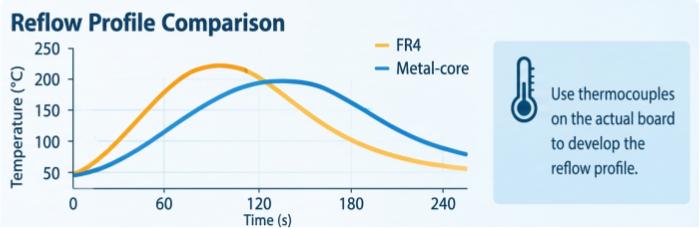
Three practical consequences follow:
The profile has to be developed on the actual board with thermocouples, not borrowed from an FR4 job.
Boards with very uneven copper and component distribution show a wider temperature spread across the panel.
Handling matters. The base side is bare metal, so boards need supported transport and fixtures. We use synthetic stone fixtures for this, and a flat, stable board through paste printing and placement is part of keeping deposits consistent.
Our standard metal-core boards are built to IPC Class 2. Base materials are 1060 aluminum or copper, board thickness runs from 0.8 to 5.0 mm, and the thickness you pick has a direct effect on how long the board takes to come up to temperature. Thicker is not automatically better for the product. If a 1.0 mm base meets your thermal budget, specifying 3.0 mm just to be safe makes reflow harder for no gain.
Dielectric and thermal numbers to put on your drawing
Put the dielectric performance on the fabrication notes instead of leaving it as a material name, because that is what the fab shop and your own incoming inspection can verify. For our aluminum boards the figures you can reference are:
| Parameter | Value |
|---|---|
| Base material | 1060 aluminum, or copper |
| Board thickness | 0.8 – 5.0 mm |
| Thermal conductivity (dielectric) | > 0.8 W/m·K |
| Thermal resistance | < 1.2 °C/W |
| Breakdown voltage | > 2 kV DC |
| Finished copper | 0.5 – 10 oz |
| Surface finish | HASL, lead-free HASL, ENIG |
| Quality class | IPC Class 2 |
Two points on reading this table. First, the thermal conductivity figure describes the dielectric layer, not the aluminum. The dielectric is the bottleneck in the heat path, which is why the aluminum pcb thermal conductivity number gets so much attention in datasheet comparisons. Second, thermal resistance depends on the area it is measured over, so check what area your thermal model assumes before comparing it against a pad footprint.
On surface finish: ENIG gives a flat pad, which helps with fine-pitch parts and with consistent paste release on small pads. HASL is cheaper and perfectly workable for larger LED and power footprints, but it leaves some pad height variation, so we would not choose it for a board that mixes fine-pitch ICs with big thermal pads. If you are unsure which finish matches your component mix, send us the BOM and we will say.
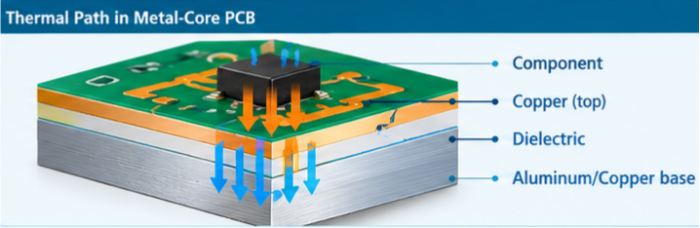
For a broader look at how thermal paths are built on these boards, our aluminum PCB capabilities page lists the full material and process options.
Copper weight, trace and spacing limits
Finished copper ranges from 0.5 to 10 oz, with line width and spacing down to 4/4 mil. Those two ends do not belong on the same board in most cases. Heavy copper wants wider spacing, and that is a fabrication reality as well as an assembly one.
For assembly, copper weight matters because it adds thermal mass at the pad. A part sitting on a heavy copper plane with a solid connection will heat much more slowly than the same part with thermal relief or a narrow neck. That is the same logic as any thick-copper board, but on a metal-core substrate the effect stacks on top of the base absorbing heat.
What we usually suggest:
Choose copper weight from the current and thermal calculation, then stop. Going from 2 oz to 4 oz "for margin" is rarely worth it unless you have actually modeled the current path.
Use thermal relief on pads that are not part of the heat path, such as signal pins of a driver IC, so they wet at roughly the same time as their neighbors.
Leave the thermal pads themselves solid. They are the heat path, and relief there defeats the point.
Keep fine 4/4 mil features away from the heaviest copper areas on the same board, and confirm with our engineering team before combining heavy copper with tight geometry.
Uneven copper distribution also shows up as a temperature gradient. A board with a large copper pour on one half and sparse routing on the other will not reflow evenly, even though both halves share the same base.
Holes, countersinks and mounting features
Metal-core boards are usually bolted to a heatsink or housing, so mounting holes are not an afterthought. The drilling and routing limits we can reference are a minimum hole size of 6 mil and a minimum annular ring of 4 mil. Countersunk holes and screw holes are supported.
The design questions that affect assembly are mostly about distance and clearance:
Hole to pad spacing. The metal base is conductive, and the dielectric breakdown figure is > 2 kV DC. Any hole through the base exposes bare metal at its wall, so keep copper pads and traces well back from the hole edge. Ask us for the specific clearance for your voltage class instead of guessing.
Countersinks. A countersink changes the local board thickness and removes dielectric support near the hole. Keep components and solder pads out of that zone. A countersink drawn tight to an LED footprint is a common reason we send a design question back.
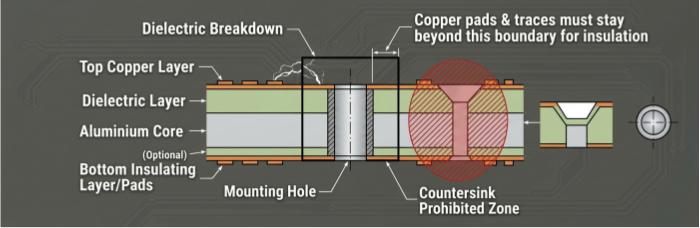
Edge and mounting hole locations. Boards are carried on fixtures and conveyors, so keep tooling holes and fiducials in positions the line can use, and avoid putting heavy parts right on the edge where support is thin. If the screw positions force a component into an awkward spot, tell us early, because moving a connector or driver later costs more than moving a hole now.
Hole count also matters for thermal behavior. Several large holes near a hot component change how heat leaves it, which affects both the end product and the reflow result.
What goes wrong during reflow, and how layout can prevent it
The three issues we see most on metal-core designs are uneven heating, voids under thermal pads, and components shifting or tombstoning on small parts next to heavy copper.
Uneven heating. If one end of a small chip part sits on a big copper area and the other end on a thin trace, the thin end wets first and the part can stand up. The fix is on the layout side: match the copper connection on both pads of every two-terminal part. Our 3D SPI and AOI catch the symptoms, but they do not remove the cause.
Voids under thermal pads. Large solder joints trap flux outgassing, and the metal base slows the reflow just enough to make that worse. Designers can help in a few ways:
Break a large thermal pad into a windowed or segmented paste pattern instead of one solid aperture, and ask us to confirm the pattern for your part.
Avoid pad finishes or surface conditions that wet unevenly. This is another argument for ENIG on boards where void performance matters.
Decide the acceptance criterion up front. We inspect with offline X-ray when void content is a concern, and the limit you need should be written on the drawing or agreed with us before the first build, not discovered during it.
Solder paste deposition is also part of the picture. We use a MYCRONIC jet printer where the application calls for it, and 3D SPI to confirm volume and position, but deposit control cannot compensate for a pad layout that traps gas by design.
Profile dependence. We run metal-core boards on the JTR-1200D-N reflow oven, and the profile is built from thermocouple data on the real board. For the specific temperatures, ramp limits and time above liquidus for your substrate and paste, confirm with our engineering team. We do not publish a one-size profile because the base thickness, copper distribution and component mix change what the board needs.
We also record process data through Smart MES, which helps when you need to trace a build back to the settings used. That is traceability, not a promise on yield, and we would rather be clear about that distinction.
If you want more background on the heat-flow side of these problems, the article on thermal issues and solutions for metal-core PCBs goes into the substrate behavior in more detail.
Design checklist
Run through these before releasing the files. Each item is something we have had to query on a real metal-core job.
Base material (1060 aluminum or copper) and thickness (0.8–5.0 mm) stated on the fab drawing, with the reason for the thickness chosen.
Dielectric thermal conductivity (> 0.8 W/m·K) and thermal resistance (< 1.2 °C/W) written as requirements, not just a material name.
Breakdown voltage requirement (> 2 kV DC) stated, with the working voltage and any clearance expectations noted.
Finished copper weight within 0.5–10 oz, justified by current and thermal calculation.
Line/space not tighter than 4/4 mil, and not mixed with heavy copper without confirming with our engineering team.
Holes at or above 6 mil, annular ring at or above 4 mil.
Countersinks and screw holes dimensioned, with pads and parts kept out of the countersink zone.
Both pads of every two-terminal part have matching copper connection.
Thermal pads solid on the board, with a windowed paste pattern proposed for large ones.
Void acceptance limit defined before first build.
Surface finish chosen against the component mix (HASL, lead-free HASL, or ENIG).
Fiducials and tooling holes placed where the line can use them.
Class 2 stated as the acceptance class.
FAQ
1. Does a thicker aluminum base always improve thermal performance?
Not by itself. The dielectric layer is usually the limiting step in the heat path, so extra base thickness adds mass without lowering that resistance. It does make reflow slower and the board heavier. Choose the thickness for mechanical needs and heatsink contact, then check the thermal model.
2. Can I use both aluminum and copper base materials in one design family?
Yes, many teams do, for example aluminum for the main product and copper for a higher-power variant. The assembly profile will not be identical, because the two bases take up heat differently, so each variant needs its own thermocouple profile.
3. Should I place components on both sides of a metal-core board?
The standard approach is components on the circuit side with the metal base facing the heatsink. If your design needs something different, send us the stack-up concept and we will review it before you commit.
4. How do I specify void requirements for a thermal pad?
Name the part, the pad, and the maximum void content you can accept, and ask for X-ray inspection on first articles. If you do not have a number from your own reliability data, discuss it with our engineering team instead of copying a figure from an unrelated standard.
5. What should I send for a design review?
Gerber files, the drawing with thickness and thermal notes, the BOM, and the target heatsink or mounting arrangement. The mounting information helps us flag hole and clearance issues early.
Helpful Resources
• A Comprehensive Introduction on Aluminum PCBs
• The Complete Guide to Aluminum PCB Manufacturing Process
• Design of High-Power PCB in High Temperature Environment
• Free DFM Check


