



A PCB fabrication drawing has to answer every question the Gerbers can't: outline tolerances, stack-up, laminate and Tg, finished copper, surface finish, mask and legend colors, impedance targets, IPC class and any special process. The readme only indexes and explains the files, and it should never be the only place a requirement lives. When both are complete and agree with each other, CAM has very little left to ask you.
A quick note on how this works when you order from us. We build to the specs you enter on the online order form: board thickness, copper weight, solder mask, silkscreen and so on. We don't treat a readme or a separate spec document as the controlling specification, so any requirement outside the form's standard options should also go in the order's special requirement field.
Your drawing still matters. It's your controlled record of the build, it goes to every supplier you work with, and it's the fastest way to settle a question if your files and your order don't match.
Why aren't Gerber files enough on their own?
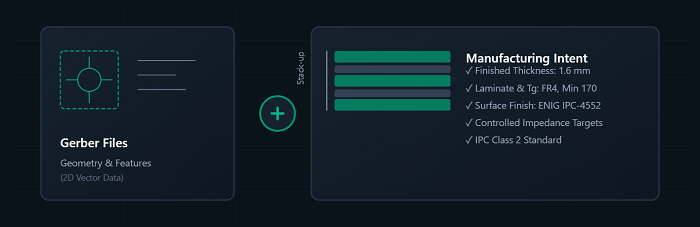
Gerbers describe geometry, not construction. Each layer tells us where copper, mask and legend go, and the Excellon file tells us where to drill, but none of them says how thick the finished board is, which laminate it is built from, how much copper ends up on the surface after plating, or which nets are impedance-controlled. Gerber X2 attributes help by labeling file functions and layer order, yet most CAM engineers still open the drawing first, because it's the one place where the designer states intent.
The questions we send when the drawing is missing or thin are predictable. Is 1.6 mm measured over the laminate or over plated copper? Which file is L2 and which is L3? Are the slots on the mechanical layer plated or not? Is the board edge the inside, the center or the outside of that outline line? Each one is a coin toss for CAM.
We'd rather put the job on hold and ask than guess and scrap a panel. A complete drawing means we rarely have to do either.
Drill data deserves its own mention. Send the NC Excellon file together with the drill tool list. Without the tool list, CAM has to infer finished hole sizes from tool numbers and work out plated versus non-plated status from context, which is exactly the kind of inference you don't want on a press-fit connector.
What belongs on the fab drawing?
Everything that defines how the board is built and how it will be judged belongs on the drawing, written as numbered notes alongside a dimensioned outline and a stack-up table. The groups below are what a CAM engineer looks for, roughly in the order they look.
Outline, dimensions and tolerances
Give a dimensioned outline from a single datum, usually a corner or a tooling hole, with overall size, cutouts, slots and the position of every hole that mates with the enclosure. Put a tolerance on each dimension that matters mechanically. If you leave a dimension untoleranced, CAM will apply the fab's standard tolerances, which may or may not suit your housing. Also state which side of the outline line is the board edge; on a tight enclosure fit, half a line width is not a rounding error.
Stack-up
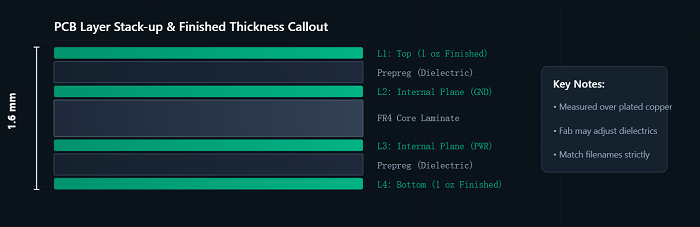
A stack-up drawing should show every copper layer in order with its Gerber filename beside it, the layer type (signal, plane or mixed), the copper weight per layer, and either the dielectric thickness you need or a note that the fab may adjust dielectrics to meet thickness and impedance.
If the build must follow one specific stack-up, say so on the drawing and in the order. Our prototype service has limited flexibility on custom stack-ups, so we usually steer fixed-stack-up jobs to the Standard PCB service, where we can share a proposed stack-up for your thickness and layer count before production.
Finished board thickness
State the finished thickness and what it is measured over. "1.6 mm finished, measured over plated copper" is unambiguous. "1.6 mm" on its own is not, because laminate thickness, thickness over plating and thickness over solder mask can differ enough to matter at a card-edge connector or a card guide. For standard FR4 we build from 0.4 mm to 3.2 mm, and thickness tolerance runs from ±0.1 mm on thin boards to ±10% on thicker ones. If a mating part sets your real limit, give that tolerance and flag it as critical.
Base material and Tg
Call out the laminate by property, not only by name: FR4 or the material family, the minimum Tg you need, and an IPC-4101 slash sheet if your company works that way. Add "or equivalent" unless you have a real reason to lock a brand, such as an RF design whose Dk and loss were simulated on one specific laminate. Brand-locking an ordinary digital board is rarely worth it; it narrows what can come off the shelf and can add time when that exact laminate isn't in stock. If you need high-Tg or halogen-free material, write it on the drawing, not just in an email thread.
Finished copper weight
Write the copper weight per layer and use the word "finished". A note that only says "1 oz" leaves CAM to guess if you mean starting foil or copper after plating, and on outer layers that choice changes etch compensation and the spacing we can hold. Inner layers on a through-hole-only build don't see plating, so base and finished values sit close together. Outer layers are where the confusion lives.
Surface finish
Name the finish and, when it matters, the governing spec, for example ENIG per IPC-4552. If some features need a different finish, such as hard gold on edge fingers, show them on the drawing with finger length, bevel angle and plating extent. A finish mentioned only in a readme is the textbook example of a requirement that slips through.
Solder mask and silkscreen
Specify mask color, legend color, which sides carry legend, and how vias are treated: tented, plugged or left open. Our standard mask colors are green, white, blue, black, red and yellow, and the legend color has to differ from the mask color or it won't be readable. If your assembler needs mask-defined pads or a minimum mask dam between fine-pitch pads, say so, because CAM will otherwise apply its own clearances.
Controlled impedance
List each controlled structure on its own line: target impedance, tolerance, single-ended or differential, signal layer, reference planes, and trace width and spacing as drawn. Then state whether the fab may adjust trace width, dielectric thickness or both to hit the target. Without that permission, CAM can only flag the mismatch and wait for you.
Our impedance tolerance options range from ±5% to ±10%; which one a given structure can hold depends on its geometry and the stack-up, so confirm tight targets with our engineering team before you freeze the layout. If you need test coupons or a measurement report, request them on the drawing and confirm with our engineering team.
IPC class
Write the class on the drawing, every time. Our standard boards are built to IPC Class 2. If your design needs a different class, or one feature needs to meet something tighter than Class 2, confirm it with our engineering team before you order rather than after boards ship. A drawing with no class note leaves acceptance criteria open to interpretation on both sides, and that argument is never pleasant after the fact.
Special processes
Anything beyond a plain plated-through-hole build needs its own note and usually its own detail view: via fill or plug type, countersinks and counterbores with angle and depth, castellated holes, edge plating, controlled-depth routing, back-drilling, press-fit holes with a finished-hole tolerance. Mark each one on the drawing and reference it in the order. For any process you don't see on our capability pages, confirm with our engineering team before you design around it.
What goes in a readme, and what shouldn't?
A readme is a map of the file package, not a second specification. Keep it short enough to read in a minute. It should cover:
• Each file and what it is for
• Layer order mapped to filenames
• Drill file format, units and zero suppression
• The design tool and version that produced the output
• The design revision
• A named contact for engineering questions, with their time zone
What it shouldn't hold is any requirement that isn't also on the drawing or in the order. Readme-only notes such as "ENIG please", "impedance on USB lines" or "same as last build" are the ones most likely to be missed, partly because they lack the detail CAM needs and partly because many fabs, ourselves included, don't treat a readme as a controlling document.
When you order from us, the order form defines the board. We don't use an uploaded readme or spec file to set specifications, so copy every non-standard requirement into the special requirement field as well.
Two other readme habits slow jobs down. Boilerplate carried over from an earlier project ("controlled impedance required", "Class 3") on a board that has neither creates a question we have to ask before we can move. And references to outside conversations, like "see Mark's email from March", point to information CAM simply doesn't have.
When the drawing and the Gerber disagree, which one wins?
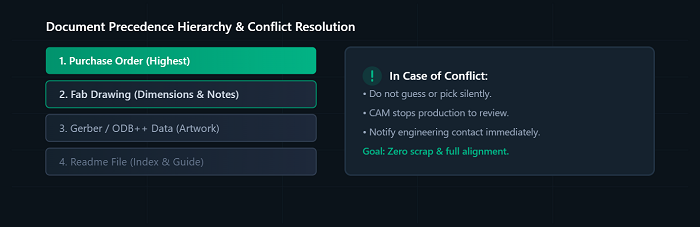
Neither should win silently. The usual convention is that the drawing governs dimensions, materials and notes while the Gerber or ODB++ data governs artwork, but any conflict between them means something changed and one document didn't follow. CAM should stop and ask, and a good drawing makes the answer obvious.
Put a precedence note on the drawing. A common wording is: "In case of conflict: purchase order, then this drawing, then Gerber data, then readme. Notify the buyer's engineering contact before proceeding." The notify clause matters more than the order, because it tells the fab you want a question rather than a judgment call.
The conflicts we see most often are an outline on the mechanical layer that measures differently from the dimensioned view, a drill chart whose hole count doesn't match the drill file, slots shown as plated on the drawing but sitting in the non-plated drill file, a stack-up table with a different layer count from the file set, and a drawing revision that doesn't match the Gerber filenames. Every one of them is found by laying two documents side by side, so it's worth doing that comparison yourself before you upload.
On our side, if the file check turns up a conflict, we contact you to resolve it before fabrication is scheduled instead of picking one version and building it.
Copy-ready checklist
Use this table as a pre-release check. Every line should be answered on the drawing or in the order, not only in a readme.
| Item | What to state | Common miss |
|---|---|---|
| Revision and units | Revision letter matching the Gerber package name, release date, mm or inch | Drawing revision differs from the file set |
| Board outline | Dimensioned from one datum; tolerances on every mating feature; which side of the outline line is the edge | Critical dimensions left untoleranced |
| Finished thickness | Nominal value, tolerance, and what it is measured over | "1.6 mm" with no reference surface |
| Stack-up | Layer order mapped to filenames, layer type, copper per layer, dielectric values or "fab may adjust" | Layer order not mapped to files |
| Base material | FR4 or other laminate, minimum Tg, slash sheet if used, "or equivalent" unless locked for a reason | Brand locked on an ordinary design |
| Finished copper | Finished weight for outer and inner layers, written as "finished" | "1 oz" with no base/finished distinction |
| Surface finish | Finish type and governing spec; selective areas with extent (gold fingers: length, bevel) | Finish stated only in the readme |
| Solder mask | Color, sides, via treatment (tented, plugged, open), any mask-defined pads | Via treatment not stated |
| Silkscreen | Legend color (different from mask color), sides | Legend color same as mask color |
| Controlled impedance | Per structure: target, tolerance, SE/diff, layer, references, width/spacing as drawn, adjustment permission | No permission to adjust width or dielectric |
| IPC class | Class written on the drawing; PCBCart standard is Class 2, anything else confirmed with engineering first | No class note at all |
| Drill data | Excellon file plus drill tool list, plated/non-plated split, finished hole sizes | Tool list missing |
| Special processes | Via fill/plug, countersinks, castellations, edge plating, back-drill, each with a detail view | Process named with no detail |
| Electrical test | Whether netlist test is required; IPC-D-356 netlist supplied if so | Test requirement unstated |
| Precedence and contact | Conflict-order note, named contact for questions, time zone | Nobody named to answer questions |
| Order form | Every non-standard item also entered in the order and its special requirement field | Requirement exists only on the drawing or readme |
FAQ
Can I send ODB++ or IPC-2581 instead of Gerbers plus a drawing?
Intelligent formats carry layer order, drill data and often stack-up and netlist in one package, which removes a whole class of file-mapping questions. They still don't replace the drawing for tolerances, IPC class, finish specs or special processes, so send both. Check accepted formats with our engineering team before you change your release flow.
Do I need a separate panel drawing?
Only if the array matters to you, which usually means your assembler has requirements for rails, fiducials, tooling holes or a particular break-away method. In that case send a panel drawing with array dimensions, step-and-repeat spacing, V-score or tab-route details and fiducial positions, and get your assembler to sign off on it first. If the array doesn't matter, leave panelization to the fab and say so on the drawing.
How do I call out a stack-up if I don't know the exact prepregs?
Specify what you actually care about: finished thickness, layer order, copper weights and impedance targets. Mark dielectric thicknesses as "fab to adjust to meet impedance and thickness" and ask for a stack-up proposal to approve before fabrication. You end up with a build matched to real material on the shelf instead of a theoretical one from a field solver's default library.
Can I require a higher class on just one feature?
A blanket class with one exception is hard to inspect against and easy to misread. If one feature needs more margin, such as the annular ring at a connector or plating thickness in a specific set of holes, write that exact requirement as a dimension or note rather than citing a class. Since our standard boards are built to IPC Class 2, confirm any note like this with our engineering team before ordering.
What should change on the drawing between revisions?
The revision letter, the date and a short change note saying what moved. Rename the Gerber package with the same revision so the two can't be mixed up, and never reuse a revision letter for changed data. A good share of "which file is right?" questions trace back to two packages carrying the same rev.
Helpful Resources
• PCB Pre-order Checklist: Files and Information to Prepare


