



A PCB engineering query (EQ) is a question from the CAM engineer that has to be answered before your board can go into production. Almost every EQ falls into one of three groups: data that is missing or contradicts itself, features below what the fab can build, or specs that can be read two ways. Most of them can be cleared before you submit, with a ten-minute check of your own files.
What is an engineering query, and why does it stop your order?
When your files arrive, a CAM engineer imports the Gerbers, drill data and fabrication notes into the tooling software and rebuilds the board layer by layer. The question is always the same: can I build exactly what this package describes, without guessing?
If the answer is "no" or "maybe", the job stops and the engineer writes to you. The hold exists because a guess on the factory side turns into a board that doesn't match your intent. Nobody wants to find that out after etching. So a CAM hold is mostly the factory declining to guess on your behalf. It is not a rejection of your design.
The practical cost is that the clock on your order is waiting on your reply. If you are in the middle of a prototype run, one unclear note can cost you a day or two of back-and-forth. That is why the cheapest fix is to find the problem yourself first. Our free DFM check catches many of these before an order is placed, and the sections below cover what it and the CAM engineer look for.
Missing or conflicting data
This is the largest group in our experience, and the most avoidable. The pattern is simple: two files in the same package say different things, or a file that should be there isn't.
Gerber and drill file disagree. The drill file shows a hole where the copper layers show no pad, or a pad with no hole. This usually happens when someone edits the board after exporting one set of files and re-exports only part of the package. CAM will overlay the layers, see the mismatch, and ask which one is correct. The fix on your side is to regenerate every output from the same board revision, in one pass, and never hand-swap a single file.

Layer count or stack-up doesn't match the files. The order form says 4 layers, the package contains six copper files. Or the notes call for a stack-up that has more layers than were ordered. Our standard range is 1 to 32 layers, so the number itself is rarely the problem. The mismatch is. Before you submit, count the copper layers in the package and compare them with the order and the stack-up drawing.
Missing or duplicated layers. No solder mask file for the bottom side. Two files both named as the top silkscreen. A paste layer included for a bare-board order. CAM can often guess, but "often" is the problem. Name your files clearly, include a layer list in the readme, and remove files that don't belong to this order.
Fabrication notes that contradict the drawing. The notes say 1.6 mm board thickness, the stack-up drawing totals something else. Or the notes mention a finish and the order form selects another. When the data disagrees with itself, CAM can't pick a winner, because either one could be your actual intent. If you have a fab drawing, treat it as the single source of truth and make sure the order form is filled in to match it.
Units and format surprises. A drill file in inches with a header that claims metric, or Gerbers that mix coordinate formats between layers. These produce a board that looks right in your viewer and obviously wrong once layers are stacked. Open the whole package in a standalone Gerber viewer, not your design tool, and check that the drill hits land on pads.
None of these need design changes. They need the package to say one thing.
Features below the fab's capability
This group is the one engineers tend to take personally, but it is usually just arithmetic. The design is fine electrically and cannot be built at standard capability without changes.
For standard FR4, the numbers to design against are:
Minimum trace width and spacing: 3/3 mil
Minimum drilled hole: 6 mil mechanical, 4 mil laser
Minimum annular ring: 3 mil
Minimum NPTH slot width: 0.8 mm
Minimum PTH slot width: 0.6 mm
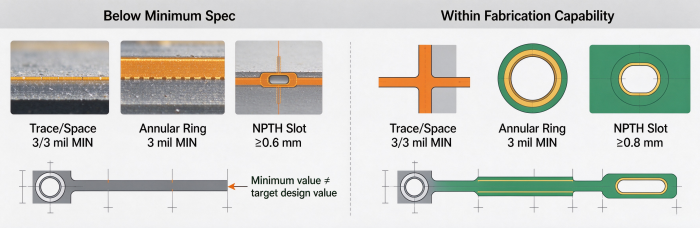
Those are minimums, and they are not a target. A board drawn exactly at 3/3 mil across a whole layer leaves no room for process variation, and CAM may come back asking to open the spacing wherever the layout allows it. If you can run 4 or 5 mil in open areas and only drop to 3/3 where you have to, do that. We would rather see a few tight spots than a whole layer drawn at the limit.
The classic EQ cases here:
Annular ring on small vias. The drill is 6 mil, the pad is barely larger, and after drill tolerance the ring falls under 3 mil. This is easy to miss because the pad size looks reasonable on screen. Check pad diameter minus drill diameter, divided by two, for every via size in your design, and do it for the smallest via first.
Slots drawn too narrow. A 0.5 mm slot cut as a plated slot falls under the 0.6 mm PTH minimum. A 0.7 mm non-plated slot falls under the 0.8 mm NPTH minimum. Slots are made with a router bit, and a bit that small is not a standard tool. If you need a narrower slot, confirm with our engineering team before you finalize the layout. In many cases a row of drilled holes does the same job.
Laser vias outside the stated range. Laser microvias at 4 mil are within capability. Asking for stacked or staggered microvias across several build-up layers, or specific aspect ratios, is a different question, and you should confirm with our engineering team before you rely on it.
Everything not listed above. Solder mask dams between fine-pitch pads, silkscreen line width, copper-to-edge clearance, copper-to-hole clearance, controlled impedance tolerance: we don't quote a number for these here. Confirm with our engineering team for your stack-up and finish, and check the published tolerances before you route.
A useful habit is to run a design rule check with fab-specific rules loaded, not the defaults of your CAD tool. Defaults are usually looser than a fab's real limits, and a clean DRC against them proves very little.
Ambiguous specs (finish, thickness, color, quantity)
The files can be perfect and the order can still stop, because a field in the order form or a note on the drawing allows more than one reading. These are the quiet EQs. Each takes the engineer thirty seconds to ask and you thirty seconds to answer, but only after the email gets noticed.
Surface finish. "Gold" can mean ENIG, immersion gold, hard gold on edge connectors, or selective gold. These are different processes with different costs and different uses. State the exact finish, and if it only applies to some areas, say which areas. If your design has gold fingers, say so explicitly, together with any bevel requirement.
Board thickness. Is 1.6 mm the finished board including copper and finish, or a core thickness? Is there a tolerance? If your design depends on a specific thickness, for example to fit a card guide or a connector, write the finished thickness and the tolerance you can accept, and mark it as critical.
Solder mask and silkscreen color. "Black" mask with "black" silkscreen is unreadable and the engineer will ask. A color name without a mask/legend pairing, or a color on one side and nothing on the other, also triggers a question. Write mask color and legend color for each side.
Copper weight. Copper weight on outer layers and inner layers is specified separately, and starting copper vs. finished copper is a common point of confusion. If you give one number for the whole board, expect a question about which layers it applies to.
Quantity and panelization. A quantity of 50 could mean 50 single boards or 50 panels. If you supply your own panel, state the number of boards per panel and the number of panels. If you want us to panelize, say so, and say whether you have array requirements for your assembly line.
IPC class. Our standard boards are built to IPC Class 2. If you need something different for your product, raise it at the start and confirm with our engineering team, rather than writing a class on the drawing and hoping it gets noticed. Contradictory notes, for instance a Class 3 call-out next to a standard-board order, are one of the more common reasons for a hold. You can read what a standard build includes on our standard PCB page, but that page is a starting point, not a substitute for your own spec.
The shortest way to remove all of these: fill in every field, leave nothing as "default", and paste the same values into the fab notes.
Outline, slot and panel issues
Mechanical data is where the most surprising EQs come from, because the electrical design is fine and the board still can't be cut.
No closed outline, or several outlines. The outline is drawn as separate line segments with small gaps, or exists on three different layers, each slightly different. A router path must be a continuous, closed shape. Put the outline on one dedicated layer, close all corners, and delete the copies on other layers or label them clearly as reference only.
Slots and cutouts hidden in the wrong place. A slot drawn on a mechanical layer with no corresponding drill entry, or an internal cutout drawn as a thin outline that the engineer can't tell is meant to be removed. Be explicit about which shapes are cut out, which are plated, and which are only graphic. If a plated slot is intended, check it against the 0.6 mm PTH width minimum, and a non-plated one against 0.8 mm.
Inside corners. A router bit is round. A sharp internal corner in an outline or cutout can't be cut as drawn, and CAM will either add a radius or ask you. Add a corner radius in your design so the result is what you expect, and confirm the size with our engineering team if the corner matters for fit.
Copper too close to the edge or to a slot. Copper that runs right to the board edge, or tracks passing close to a routed slot, risk exposure when the profile is cut. We don't state a clearance number here. Confirm with our engineering team, and leave more room than you think you need.
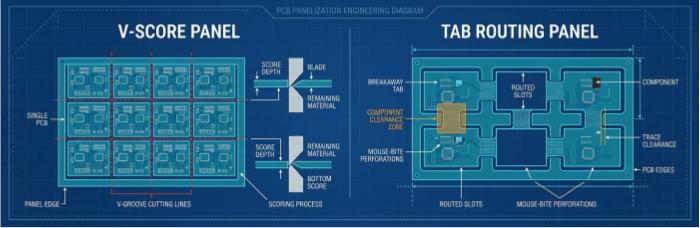
Panel drawings that don't match the order. The panel drawing shows a V-score, the notes say tab routing, the quantity implies neither. Or breakaway tabs sit exactly where a connector or a component overhangs. Decide the separation method early, keep it consistent between drawing and notes, and keep components and copper clear of the break points. For details on rails, fiducials and spacing, confirm with our engineering team, especially if the panel feeds an assembly line later.
Pre-submission self-check
Run this list on the final package, after the last export, and treat any "no" as something to fix before you upload.
| Check | What to confirm | Typical EQ it prevents |
|---|---|---|
| Single revision | All Gerber and drill files exported together from one board revision | Gerber/drill mismatch |
| Layer count | Number of copper files equals ordered layer count (1–32) and matches the stack-up | Layer count conflict |
| File naming | Every file named by layer; no duplicates or leftover files | Missing or duplicated layer |
| Units and format | Drill and Gerber units and coordinate format are declared and consistent | Drill hits off pads |
| Trace/space | Nothing under 3/3 mil; open areas relaxed where possible | Below-capability line/space |
| Drill sizes | Mechanical holes at 6 mil or larger; laser holes at 4 mil or larger | Below-capability drill |
| Annular ring | (Pad − drill) ÷ 2 is at least 3 mil for every via and pad size | Ring breakout |
| Slots | PTH slots at 0.6 mm or wider; NPTH slots at 0.8 mm or wider | Slot below router limit |
| Outline | One closed outline on one layer; inside corners radiused | Unroutable profile |
| Edge copper | Copper kept clear of edges and slots; clearance confirmed with our engineering team | Exposed copper at profile |
| Finish | Exact finish named, with areas if selective | Ambiguous finish |
| Thickness | Finished thickness and tolerance stated | Thickness question |
| Colors | Mask and legend colors given for each side | Unreadable color pairing |
| Copper weight | Stated per layer, with starting or finished weight noted | Copper weight question |
| Quantity | Boards or panels stated clearly; panel layout described if supplied | Quantity ambiguity |
| IPC class | Standard Class 2 unless agreed otherwise with our engineering team | Conflicting class call-out |
| Notes vs. drawing | Order form, fab drawing and notes all say the same thing | Contradictory specs |
If you want a second opinion on the layout rules, our design tips and the general PCB checklist are listed below, and the free DFM check will flag many of the items above automatically.
FAQ
Does an engineering query mean my design is wrong? Not usually. Most EQs are about the package: a file that's missing, a note that conflicts with the drawing, a field left open. Some are about capability. Even then the design may be sound, but a few features need to change for standard fabrication.
What should I send back when I answer an EQ? Answer in writing and, if the answer changes the data, send a corrected full package rather than a single replacement file. Partial updates are how the next Gerber/drill mismatch gets created. If the answer is only a clarification, state it plainly and quote the engineer's question so nothing gets misread.
Can I tell the factory to just build it as it is? Sometimes, but it depends on what the issue is. If the question is about a feature below capability, the result may not be what you expect, and whether we can proceed is something to confirm with our engineering team. For ambiguous specs, a clear written answer is almost always better than "build as is".
Is a drawing enough, or do I need to fix the Gerbers too? Fix the Gerbers. A fab drawing is useful for intent, but production tooling is built from the files. If the drawing and the files disagree, that is itself the cause of the hold.
How do I reduce EQs on a design I reuse often? Keep one set of fabrication notes and one order template for your recurring boards, update them whenever the stack-up or finish changes, and change only what is different on the next revision. Most repeat EQs come from copying old notes onto a new design.


