



To transfer PCB assembly to a new manufacturer, get the full data package and any customer-owned tooling out of the old CM first, then run a controlled first build at the new CM against the same acceptance criteria. Keep the old line available until that build passes. Most transfers that go badly do so because the files on paper and the boards on the shelf were never the same thing, and nobody found out until the new CM's first build failed test.
What data and tooling do you need to pull back?
You need enough to rebuild the product without a single phone call to the old CM. That is the test we apply when a customer sends us a transfer package: could an engineer who has never seen this product build it from these files alone? If the answer depends on someone at the previous factory remembering how a step was done, the package is incomplete.
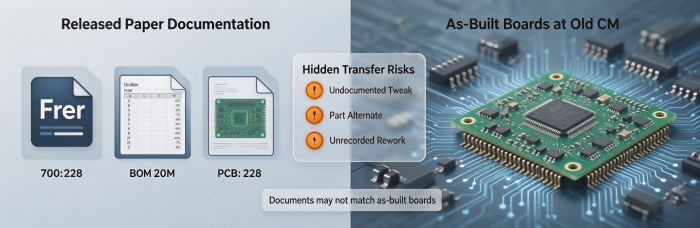
The core data is the one everybody expects: Gerber or ODB++ files, the fabrication and assembly drawings, the centroid file, and the BOM. The part people miss is that the BOM you have in your PLM or your inbox is the released BOM, and what the old CM has been loading on the line may differ from it. Ask for the as-built BOM, meaning the manufacturer part numbers actually placed on the last few lots, together with the approved vendor list and any alternates that were accepted along the way. Then compare the two line by line. We usually find a handful of differences even on mature products, and every one of them needs a decision from you before the new CM orders anything.
Beyond the BOM, ask for:
ECO and revision history, so the new CM knows which revision of the board and BOM is current.
Test procedures, test limits, programming files and the firmware revision loaded at the end of the line.
Work instructions, special handling notes, labeling and packaging requirements.
Inspection and test records, plus any rework or defect history the old CM is willing to share. Even a rough record of where boards failed tells the new CM where to look first.
A golden sample, ideally two, built and signed off by you.
Tooling needs a more careful conversation. Stencils are process-specific and are usually remade by the new CM, so there is rarely a reason to ship the old one. Test fixtures are different. ICT fixtures, functional test rigs and programming jigs are often paid for by the customer, and rebuilding them from scratch costs real time. Check your agreement to see who owns what, and ask for it in writing before the relationship gets difficult. Any consigned or customer-owned inventory, such as programmed devices, special connectors or bare boards, belongs on the same list.
Before the files go anywhere, it is worth asking the new CM to run a DFM review on the transferred files. A new set of eyes on an existing design often turns up issues that the old CM worked around by hand, and you would rather learn about them now than during the first build.
How should the first build at the new CM be run?
Treat it as a validation build, not as a production order that happens to be small. The goal is to prove that the new line reproduces the product you already know, and to find out where it does not.
The order we follow is straightforward. First, reconcile the BOM and settle sourcing, because the first build cannot start until the parts are in hand and agreed. Second, build a small lot with the full process: jet printing of paste on a MYCRONIC printer, placement, reflow on the JTR-1200D-N, selective soldering on the ZSWHPS-11-2 where the board has through-hole parts that need it, and inspection with 3D SPI and AOI. The reflow profile is set up for your board on our oven. We use the old CM's profile as a reference at best, since a profile tuned for another line's oven does not carry over cleanly. Specific profile and process parameters for your board should be confirmed with our engineering team.
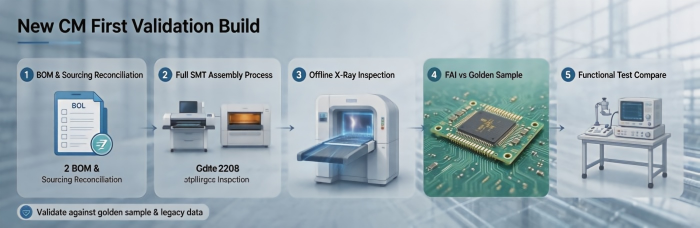
BGAs, QFNs and other bottom-terminated parts get an offline X-ray check on the first boards, even if the old CM never did one. The point is not to doubt the product. It is to have a baseline that does not depend on assuming the old process was clean. Smart MES records the build under unique IDs, so every first-build board can be traced back to its lot, its operator station and its inspection results.
Then comes the first article. A proper first article inspection compares the new boards against your drawings, your BOM and the golden sample, and it ends with your sign-off, not ours. Run the same functional test the old CM used, with the same limits, and compare the results with the old CM's records. If a board passes at the new CM and would have failed at the old one, or the other way round, that difference deserves an explanation before anyone moves on.
Parallel production is the step many teams skip, and it is rarely worth skipping. After the first article is approved, release a production-representative build at the new CM while the old CM remains the supply of record. Run both against identical acceptance criteria. Only when the new line has produced boards you are comfortable shipping do you move the volume across, and that decision belongs to you. We do not set it for you, and nobody should promise it in advance.
Where do transfers usually go wrong?
The largest risk is undocumented process knowledge. The old CM has been building your product for a while, and over that time small adjustments pile up: a part substituted after a shortage, a test limit loosened on the floor, a manual touch-up that never made it into a work instruction, a firmware version flashed because it was the one on the shelf. None of that is in your files. All of it is in the boards you have been accepting.
The first pattern is a released BOM that differs from the as-built one. The new CM builds to the paper BOM, and the boards then behave differently from the golden sample. We ask for the as-built BOM from recent lots and a signed list of approved alternates before any order is placed.
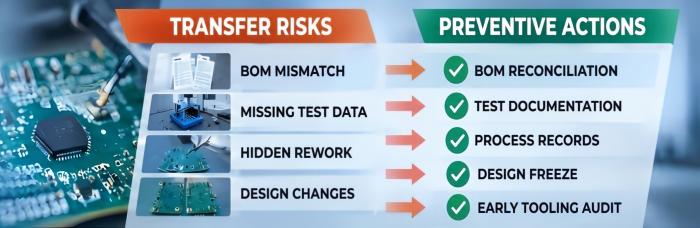
The second is test limits or procedures that lived only on the old CM's floor. The new CM's boards fail test, or pass there and fail at your site. Get the procedure, limits, fixture files and firmware revision in writing.
The third is hidden manual operations, such as a hand fix at the old CM that nobody documented. Rework and touch-up records help, and so does a close look at the golden sample.
The fourth is a change made during the move. If the design or BOM changes at the same time as the transfer, a failing board cannot be traced to either one. Freeze the design until the transfer is done.
The last is an old CM that stops cooperating, with files arriving slowly and tooling held back. Make the data and tooling requests early, under your existing agreement.
The component side deserves special attention. A transfer is the first time in years that someone reconciles your BOM against what is actually available, and long-lead or end-of-life parts surface at exactly the wrong moment. Ask the new CM early how it handles availability checks and alternates, and who approves each substitution.
The other common mistake is treating the move as logistics. Boxes of files and fixtures get shipped, a PO is placed, and the first real check is a production lot. By then the cost of finding a problem is a scrapped lot and a delayed shipment to your own customer.
Transfer phases
Think in phases, each with an exit condition, rather than in a calendar. How long each phase takes depends on your product, your documentation and the state of the old CM's cooperation.
| Phase | What happens | Exit condition |
|---|---|---|
| Audit | Collect the data package, compare released and as-built BOM, list tooling and who owns it | Package complete, differences decided by you |
| Review | New CM reviews files, runs DFM, reconciles BOM, checks sourcing | Open questions closed, BOM approved |
| Tooling and test | New stencil, fixtures and programs prepared; test method confirmed | Test method gives results consistent with the old CM's records |
| First build | Small validation lot, first article inspection against golden sample | Your sign-off on the first article |
| Parallel production | Production-representative build while the old CM remains supplier of record | Results meet the same acceptance criteria as the old CM's |
| Cutover | Volume moves to the new CM, old CM released | Your decision, based on phase 5 data |
Transfer checklist
Use this before you send the package to a new CM, and again before you give notice to the old one.
Gerber/ODB++, fabrication drawing, assembly drawing, centroid file at current revision
Released BOM and as-built BOM, with manufacturer part numbers and approved alternates
ECO history and a statement of which revision is current
Test procedures, limits, fixture design files, programming files, firmware revision
Work instructions, handling notes, labeling and packaging requirements
Inspection, test and rework records from recent lots
Two signed-off golden samples
Written list of tooling, fixtures, stock and consigned material, with owner for each
Acceptance criteria for the first article and for the parallel build, agreed in writing
Design freeze confirmed for the duration of the transfer
Old CM supply plan kept active until your cutover decision
FAQ
What if the old CM will not give us the BOM or the test files?
You can rebuild from Gerber files, a golden sample and a reverse-engineered BOM, but you are inferring what the old CM did, so your sign-off on the reconstructed BOM is not optional.
Does a change of factory trigger requalification of the product?
That depends on your regulatory or customer requirements, so ask whoever owns compliance on your side before the first build.
Should we freeze the design during the transfer?
Yes, in almost every case. Fold in pending ECOs after the transfer is complete.
Who should own the new fixtures and programs?
Decide at the start, in writing. Fixtures and programs you paid for should be yours, and the agreement should say where they are kept and how they come back.
What do we do about parts with long lead times?
Flag them during BOM reconciliation, not after the first PO. Any alternate we propose needs your approval.
Helpful Resources
• Switching EMS Providers Mid-Production: A Risk Mitigation Framework for Hardware OEMs
• Elements Ensuring Your First-Time Success in New Product Introduction (NPI) during Electronic Manufacturing
• Some Handy Methods in Evaluating SMT Assembler's Capabilities
• PCB Pre-order Checklist


