



Give every net you plan to test its own exposed pad, put the pads on one side of the board where you can, and keep them clear of tall components and the board edge. Pad size and pitch are set by the tester's probe, and ICT fixtures are less forgiving than flying probe on both. Settle during layout, not after Gerber release, which nets you will knowingly leave without access.
What does each tester need from your layout?
An ICT fixture needs a dedicated, exposed pad on every net it has to measure, on the side the fixture will contact, in positions a probe plate can actually be drilled for. A flying probe is far more forgiving. It can land on component pads, via rings and through-hole leads on either side, so a board with no purpose-made test points can still be tested.
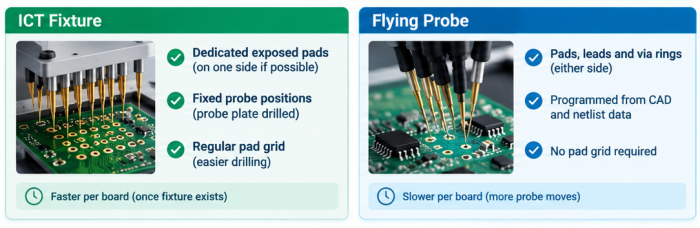
The price of that tolerance is time. Every net is a probe move, and double-sided access slows the program down, which starts to matter as quantities grow. The cost and volume side of the decision is covered in our ICT vs flying probe comparison, so this article stays on layout: what to draw so that either route stays open.
Bare-board electrical test is a separate step that happens earlier. We run it at 10–250 V using a flying probe or a test fixture, and it checks the unpopulated board for opens and shorts. Everything below is about the assembled board, where the tester has to reach nets through and around components.
| Item | ICT fixture | Flying probe |
|---|---|---|
| Contact points | Dedicated exposed pads, ideally on one side | Pads, leads and via rings, either side |
| Probe positions | Fixed when the probe plate is drilled | Programmed from CAD and netlist data |
| Layout change after release | Probe plate rework or a new plate | Program update |
| Pad grid | Regular, repeatable spacing helps | Not required |
| Tall parts near a pad | Can clip the probe plate or pressure plate | Can block the probe's approach |
| Time per board | Short once the fixture exists | Longer, grows with the number of nets touched |
How big should a test point be, and how far apart?
Size them for the probe, which means getting the tester's probe spec before you draw the pad. The smallest probe the fixture has to use sets your minimum pad size and pitch. Flying probe heads need less room, but they have their own tip size and positioning tolerance. One pad size does not suit every tester, and a number printed here would be wrong for somebody's setup. Confirm pad diameter and pitch for your board with our engineering team before layout freeze.
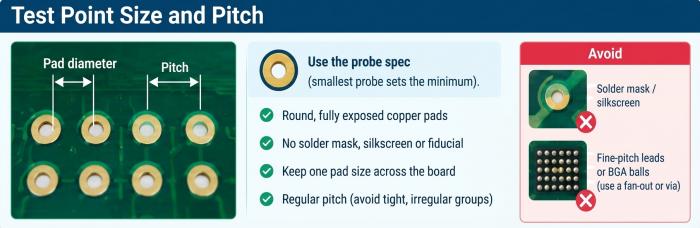
Beyond the numbers, a few habits save fixture headaches. Use round, fully exposed copper pads with nothing on them: no solder mask encroaching, no silkscreen, no fiducial. Keep one pad size across the board where you can, because mixed sizes force mixed probe types, and every type adds cost and one more part that wears out. Keep the pitch regular. Tight, irregular pad groups push a fixture toward small probes and fussy drilling, which is rarely worth it unless the board leaves you no alternative.
Don't probe fine-pitch leads or BGA balls. Route a short stub or a fan-out via to a proper pad instead. A via only works as a test point if its copper is exposed, and a tented via is a poor target.
Where should you place test points?
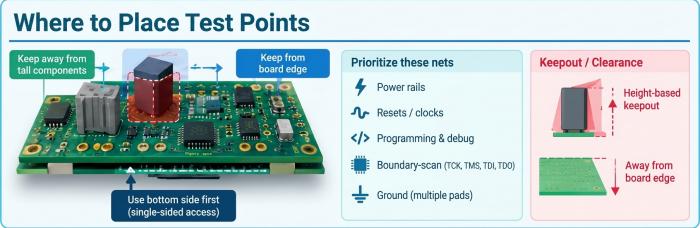
Bottom side first, and away from anything tall. For ICT, single-sided access means one probe plate does the job. Two-sided access means a double-sided fixture, which costs more and has more places to fail. Flying probe accepts both sides, though you pay for it in test time. On a double-sided assembly we usually ask for the test pads on the side with fewer and shorter components.
Draw a keepout around each tall part and let it grow with the part's height, because the body clips the probe plate or the probe's approach angle. Connectors, electrolytic capacitors, shield cans and heat sinks are the usual offenders. The distances depend on the tester, so confirm them with our engineering team rather than copying a number from a forum post.
Keep pads back from the board edge. That area is taken by rails, clamps and tooling holes, and on a panel it is also where tabs and break-off points sit. A pad that looks fine in the CAD tool can end up under a clamp.
For net selection, power rails, resets, clocks, programming and debug lines, and the boundary-scan pins (TCK, TMS, TDI, TDO) get dedicated pads first. Ground needs several pads spread over the board, not one in a corner. If a part supports boundary scan, you can often cover the nets under a BGA without routing every one of them to a pad.
How much coverage is enough for prototype vs production?
For a prototype, cover the nets that would kill the board if they were wrong and write down the rest as untested. For production, push net access as high as the fixture cost justifies and cover what is left by inspection.
First pin down which coverage you mean. Net access coverage is the share of nets a probe can touch. Defect coverage is the share of likely manufacturing faults the test would catch. They move independently: a board can have high net access and still pass a wrong-value capacitor if the program never measures it. "As high as possible" on a spec tells nobody what to do, so name the nets and the method.
At prototype stage a flying probe can use component pads, so dedicated pads for power, ground, programming and anything you expect to debug are usually enough. Leave signal-net access incomplete on purpose if routing is tight, and keep a list of what you skipped.
Before releasing a fixture for production, go through that list again. A net with no probe access and no other check is unprotected, and someone should sign off on that. Nets you can't reach electrically can partly be covered by AOI, which checks placement and visible solder joints optically, and by offline X-ray for BGA joints hidden under the package. Neither replaces a continuity or value measurement, so match the method to the failure you worry about: AOI for a missing or shifted part, X-ray for a ball you can't see, a probe for an open on a net that has real consequences.
What test data should you send with your order?
Send the files the test program is built from, plus a short note on what you expect the test to prove.
Gerber and drill files
BOM with manufacturer part numbers
Centroid (pick-and-place) file
Netlist exported from the final layout, in IPC-D-356 if your CAD tool supports it
Test point list with net name, X/Y coordinates and side
Value and tolerance for each passive you want measured, where tighter than the BOM shows
Firmware image, power-up sequence, voltages and expected readings if there is any powered or functional step
List of nets left untested, with the check you plan to use instead
Export the netlist after the last layout change. A stale netlist gives a program that fails good boards or passes bad ones, and that usually shows up only at the first build.
We don't do schematic design, so test intent stays with your team. When you submit files for DFM review, say which tester you expect to use, so whoever reads your layout has that in mind.
DFT checklist
Every net you intend to test has a dedicated exposed pad, or a written reason why not
Pads are free of solder mask, silkscreen and fiducials
Pad diameter and pitch confirmed against the tester probe (confirm with our engineering team)
Test pads on one side wherever possible
Keepout around tall parts checked against the tallest component nearby
Pads clear of the board edge, rails, tooling holes and panel tabs
Power, several grounds, resets, clocks, programming and boundary-scan pins all have pads
No probing of BGA balls or fine-pitch leads; fan-out vias or stubs used instead
No tented vias used as test points
Netlist exported after the final layout change
Test point list (net, X/Y, side) included in the package
Untested nets listed with the alternative check, whether AOI, X-ray or functional test
FAQ
Can a through-hole lead serve as a test point?
A flying probe can often land on a through-hole lead or its solder joint, which is one reason it needs fewer dedicated pads. An ICT fixture likes it less, because lead length and fillet shape vary from board to board and the contact is less repeatable. If the net matters for ICT, give it a pad.
Do I need a test point on every net?
No. Each net you skip should be a decision with a reason, such as a short local connection that AOI can confirm, or a net reached through boundary scan. Write the reason next to the net in your untested list so the next revision doesn't lose it.
Does a test point hurt a high-speed signal?
It can. A pad on a stub adds capacitance and a reflection point. Put the pad directly on the trace rather than on a branch, keep it as small as the tester allows, and run it through your signal-integrity check. On the fastest nets, skipping the pad and relying on boundary scan or functional test is often the better trade.
Should I label test points on the silkscreen?
Yes, with TP reference designators placed beside the pad, never on it. It helps bring-up and failure analysis, and your test point list can then be matched by name as well as by coordinates.
What if I can only put test points on the top side?
Say so before layout freeze. A flying probe copes with top-side access without much trouble. An ICT fixture would have to work around component bodies on the same side, so the keepouts get hard to hold and a bottom-side fixture may need a layout change.
Helpful Resources
• Test Point Design Guidelines for ICT & Flying Probe Testing on Life Sciences PCBA
• Comparison of AOI, ICT and AXI and When to Use Them during PCB SMT Assembly
• Panel Requirements for PCB Assembly
• PCB Pre-order Checklist


