



Standard PCBA submission requires Gerber files (RS-274X format specifically — older 274D format is not accepted), a separate Excellon drill file plus a drill tool list, a pick-and-place/centroid file, and a BOM with manufacturer part numbers. Some suppliers will also accept native CAD files directly — Protel's .PCB/DDB or Eagle's .BRD, for instance — as an alternative to exporting Gerber yourself. When files don't match requirements, a competent supplier flags the mismatch during review rather than guessing at your intent, but the single most common cause of quote delay specifically isn't a missing file at all — it's a version mismatch between the files you do submit.
What Each File Actually Tells the Factory
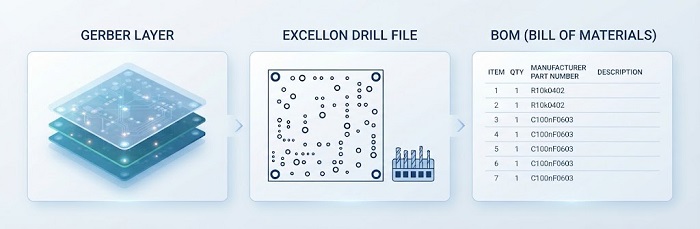
Gerber (RS-274X) describes the physical board images layer by layer — copper, solder mask, silkscreen. The Excellon drill file specifies hole locations, and the accompanying tool list specifies the actual drill diameters, since the Excellon file alone doesn't always make tool sizing unambiguous. The pick-and-place file gives component placement coordinates and rotation. The BOM ties it all together with manufacturer part numbers, not just generic descriptions, since a description like "10k resistor" leaves the exact part — and its footprint, tolerance, and package — to the assembler's interpretation rather than yours. Two newer consolidated formats — ODB++ and the more recent IPC-2581 — bundle several of these into a single file set, reducing the chance that one layer goes missing or falls out of sync with the rest.
None of these files is redundant with the others, which is worth internalizing before assuming a "complete enough" submission based on having most of them. A Gerber set with no accompanying BOM tells a fabricator what the board looks like but nothing about what populates it. A BOM with no placement file tells an assembler what parts exist but not where they go. Each file answers a question the others structurally cannot, which is exactly why a submission missing even one of them isn't "mostly complete" — it's missing information nothing else in the package supplies.
The Single Most Common Cause of Quote Delay
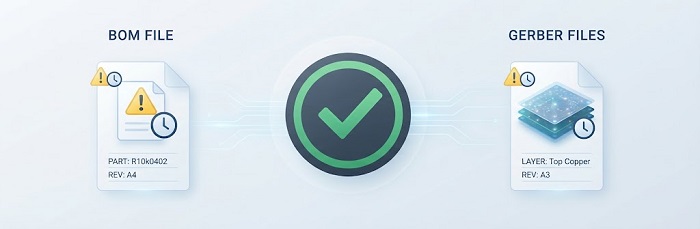
It's not a missing file — it's a mismatched revision. When your BOM references one version of the design and your Gerber or assembly drawing reflects an earlier or later one, the quoting team can't confirm placement counts or component fit with any confidence, and the request stalls until someone resolves which version actually governs. This happens more easily than it sounds: a last-minute component swap gets updated in the BOM but the placement file doesn't get re-exported, or a Gerber gets regenerated after a design tweak but the BOM file sent alongside it is the one from before the tweak. Confirming that every file in your submission — BOM, Gerber, drill files, assembly drawing — references the identical design revision is worth a specific, deliberate check before you submit, not an assumption.
This is also one of the harder submission problems for a supplier to catch reliably on their end, which is exactly why it's worth owning on yours. A missing drill tool list or an ambiguous test method is something a reviewer can spot by looking at what's present versus what's expected. A revision mismatch often looks completely normal on the surface — every file is present, properly formatted, and internally consistent — the only thing wrong is that two files describe two different points in time, and nothing about either file in isolation reveals that. Catching this requires either a deliberate cross-check against your own revision history, or a reviewer who happens to notice a placement count or footprint that doesn't quite square with the BOM — the latter isn't something you should count on happening reliably.
Beyond the Top Cause: Several Other Common Ones
The revision-mismatch issue above accounts for more delay than anything else on this list, but several other issues show up often enough to be worth checking for every time, even though the evidence doesn't clearly establish a strict order among them:
• Missing or ambiguous DNP (Do Not Populate) flags. Whether a listed component should actually be placed affects both material cost and placement time, and quoting teams can't safely guess.
• Distributor part numbers instead of manufacturer part numbers. A distributor SKU forces a manual cross-reference step before sourcing risk can even be assessed, adding time that a real MPN would have avoided entirely.
• Missing drill tool list. The Excellon file alone frequently doesn't specify tool diameters unambiguously, making this a perennial first-time submission gap.
• No test method specified. Without one, quoting teams default to a placeholder assumption that's almost always revised once you clarify — restarting part of the review cycle.
Why This List Is Worth Reviewing Before You Submit, Not After
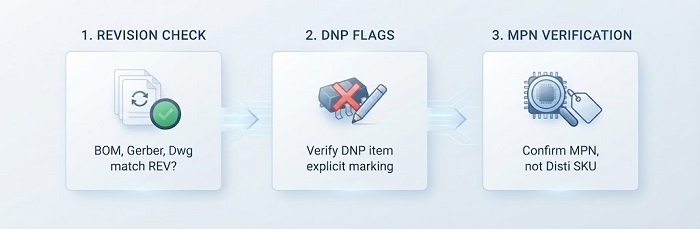
Every item on that list is something you can check yourself in a few minutes before submission, and every one of them is meaningfully more expensive to discover after a supplier's team has already started reviewing your files and come back with questions. A quick internal pass — do the BOM, Gerber, and assembly drawing all reference the same revision? Is every DNP item explicitly marked rather than just absent from a notes column? Does every BOM line carry a manufacturer name and part number, not just a distributor SKU? — catches the large majority of what would otherwise come back as a clarification request days later.
Common Mistakes With File Submission
• Assuming the Excellon file alone specifies drill sizes clearly enough. It frequently doesn't — submit the separate tool list rather than assuming the drill file is self-explanatory.
• Re-exporting one file after a late change and forgetting the others. A BOM update without a matching placement-file re-export is exactly how revision mismatches happen, even when nobody made an error in either file individually.
• Using distributor SKUs in the BOM instead of manufacturer part numbers. This seems like a minor shortcut but forces manual cross-referencing on the supplier's end before they can even assess sourcing risk.
• Not specifying a test method and assuming a default will be "close enough." Quoting teams have to assume something in the absence of a stated method, and that assumption is revised often enough to cause real delay.
FAQs
1. If my CAD tool doesn't natively export any of the accepted formats, what are my options?
Ask the supplier directly — many can work from a broader range of proprietary formats than their published list suggests, or can convert on your behalf, but confirm which specific formats and versions before assuming yours isn't supported.
2. If I switch from separate Gerber files to a consolidated format like ODB++ partway through a relationship, does that trigger a fresh DFM review?
Often yes, since it's effectively a new submission format even for a design the supplier has built before — worth asking about rather than assuming a reorder-speed turnaround on the first order using the new format.
3. If my BOM and Gerber have a revision mismatch, will a supplier catch it or just build from whichever file arrived last?
A supplier with a real review process will flag the mismatch and ask which revision governs, rather than guessing — this is worth confirming as part of evaluating a new supplier generally.
4. Does a missing test method actually delay my quote, or just get assumed silently?
It depends on the supplier — some quote against a default assumption and flag it for confirmation, others hold the quote until you specify, so ask which applies before assuming your quote reflects the test scope you actually want.
5. Can a supplier tell me if my files are current based on what I sent them last time?
Not reliably — they can compare this submission against their own records from your last order, but they have no way to know about changes made on your end that were never sent to them, so don't count on them to catch a mismatch you haven't flagged yourself.
Helpful Resources
• How to Generate Gerber Files Based on Different PCB Design Software
Ready to submit a complete, revision-matched file set? Request a PCB Assembly quote and double-check every file references the same design revision first.


