



A BOM a contract manufacturer can quote without sending questions back has the same five things on every line: a manufacturer part number (MPN), the manufacturer name, a quantity that matches the designator count, a package, and a clear fit or DNP status. Most of the delays we see come from lines missing one of those, not from exotic parts. An hour of scrubbing before you send the RFQ usually saves several rounds of email.
Which columns does a CM need in a PCBA BOM?
Seven columns are the baseline. We ask for a single-sheet Excel or CSV file with one header row and no merged cells.
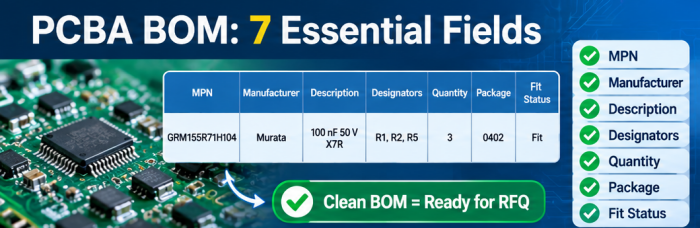
Start with the identity of the part: MPN and Manufacturer. Enter the full manufacturer part number, suffixes included, and the manufacturer name as it appears on the datasheet. These two columns are what we actually source against, so they matter more than anything else in the file. Next to them, add a Description with value, tolerance, voltage or power rating, and dielectric where it applies. We read it as a cross-check. If it says 100 nF 50 V X7R and the MPN decodes to a 16 V part, one of them is wrong, and we would rather ask than guess.
Then the placement data: Designators, Quantity and Package. List designators separated by commas (R1, R2, R5) and avoid ranges like "R1-R10", which some import tools misread or drop. Quantity must equal the number of designators on that line. Package is the physical size, such as 0402, SOT-23-5 or QFN-32 5x5, and it should match the footprint in your layout.
The last column is Fit status: Fit or DNP, with one convention used on every line.
Three optional columns are worth adding. A line number lets both sides say "line 23" without confusion. A buy status (Buy or Consigned) helps if you supply some parts yourself. A comment column is the place to flag single-source or sensitive parts.
Put one MPN per row. If three resistors share a value but come from different manufacturers, that is three rows.
The BOM only describes parts. For assembly we also need your Gerber files and a pick-and-place file, and the designators in all three must agree.
What BOM errors do we see most often?
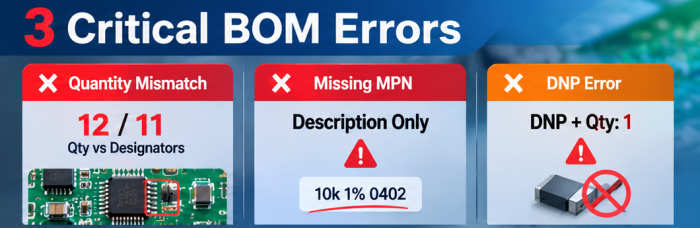
Quantity mismatches come first. A line says quantity 12 and lists 11 designators, or the reverse. Usually the schematic changed after export and one column got refreshed while the other did not. We cannot tell which number is right from the file, so the line goes back to you.
The others, roughly in the order we meet them:
Description-only lines. "10k 1% 0402" with no MPN is fine for a quick prototype if you accept that we pick an equivalent. It becomes a problem when you expected a specific part and never said so. Anything sensitive, such as feedback dividers or timing networks, should carry a real MPN.
Distributor SKUs in the MPN column. A Digi-Key or Mouser number is not a manufacturer part number. We can usually resolve it, but it adds a lookup, and the SKU may point to a cut-tape variant.
Truncated MPNs. A capacitor exported as "GRM155R71H104" without its trailing characters can match several different parts. If your CAD library stores the short form, fix the library once instead of every BOM.
Missing manufacturer. The same MPN string can exist under more than one brand, especially for generic passives and connectors.
BOM and pick-and-place file out of sync. Test points, fiducials and mounting hardware are the usual culprits.
DNP parts still carrying a quantity. A part marked "DNP" in the description but with quantity 1 can get bought and placed.
Package and footprint disagree. The BOM says 0603, the layout has an 0402 pad pattern. This tends to surface at engineering review, after you thought the quote was settled.
Spreadsheet habits. Hidden rows, comments inside cells, several tabs with partial lists, and colored text that carries meaning ("red = optional"). Colors do not survive a CSV export.
If you only have time to fix three things, fix the quantity-to-designator match, the MPN and manufacturer pairing, and the DNP convention.
How do you check lifecycle and availability before the RFQ?
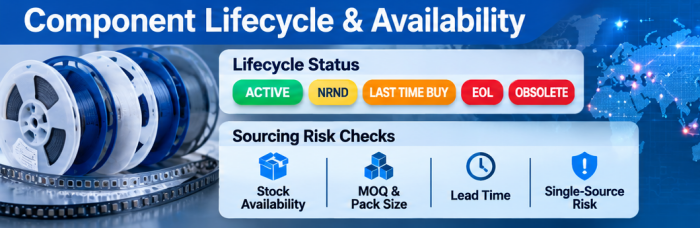
Run every MPN through at least one distributor or aggregator search and note three things: lifecycle status, stock, and whether the part is single-source. With a BOM import tool this takes minutes, and it is the most useful check you can do before sending the file.
For lifecycle, flag anything marked NRND (Not Recommended for New Designs), Last Time Buy, End of Life or Obsolete. An NRND part is often still buyable, and a short run may be fine. A product you plan to build for years is a different story, and that is a design decision for you to make before sourcing starts.
For availability, look at stock at authorized channels, minimum order quantities and standard pack sizes. A resistor sold on 5,000-piece reels when your board needs 40 per unit is normal in high-mix, low-volume work, and it affects cost more than most people expect. If you need parts only from authorized distributors, say so in the RFQ. If franchise-sourced equivalents are acceptable for commodity passives, say that too. Our component sourcing process covers how procurement works on turnkey builds.
Single-source parts deserve a note in the comment column. We would rather hear about a connector with no second source while quoting than discover it later. Availability changes with the market, so we do not fix a lead time from the BOM alone. What we can do is flag the risk early, so you can decide whether to change the part or plan around it.
How should you mark alternates in a BOM?
Give each alternate its own row, tied to the primary line, and say whether we may use it. Do not write "or equivalent" in the description, and do not put two MPNs in one cell.
A layout that works for most teams: keep the primary's line number, add an "Alt #" column (blank for the primary, then 1, 2 and so on), and add an "Approved" column. Yes means we may substitute without asking. No means the alternate is listed for reference and we must ask first.
How strict to be depends on the part:
General-purpose passives: describe the allowed range once, for example "any 0402 1% thick-film resistor of the same value and at least the same power rating." Say what can vary and what cannot.
ICs, regulators and anything with firmware or timing behavior: list exact alternates or write "no substitution." Pin-compatible is not always behavior-compatible.
Connectors and electromechanical parts: mention anything that affects fit, such as height, orientation or mating part, even if the footprint matches.
If you want no substitution on the whole board, say it once at the top of the RFQ and keep the BOM clean. That is a legitimate choice. It just means we will come back to you when a part is unavailable.
What does a BOM self-check look like?
Run through this list before you attach the file. You will probably catch two or three problems.
| Check | Pass condition | If it fails |
|---|---|---|
| Qty vs. designators | Count of designators equals quantity on every line | Re-export from CAD and compare totals |
| MPN present | No blank MPN cells, except lines intentionally marked “buyer's choice” | Add MPN or mark line as open |
| Manufacturer present | Every MPN has a manufacturer in its own column | Fill from datasheet or distributor page |
| MPN is a manufacturer number | No distributor SKUs in the MPN column | Replace with the manufacturer's part number |
| Full suffix | Packaging, tolerance and grade suffixes included | Check against the datasheet's ordering table |
| Footprint match | BOM package matches the layout footprint for each line | Check the footprint in CAD, then fix the BOM or the library |
| DNP convention | One fit-status column; DNP lines carry no quantity to buy | Move DNP parts to a separate list or flag clearly |
| Designators consistent | Same set of designators in the BOM, centroid file, and assembly drawing | Reconcile the three files |
| No duplicates | No designator appears on more than one line | Search for repeats |
| Lifecycle checked | No unreviewed NRND, EOL, or obsolete parts | Replace the part, or mark it for review in the RFQ |
| Alternates structured | One alternate per row, with an Approved flag | Split cells, remove “or equivalent” wording |
| File is clean | Single sheet, no merged cells, no hidden rows, no color-coded meaning | Save as plain CSV and reopen to check |
Then add a short cover note to the RFQ: board quantity, whether you want a full turnkey build or will consign some parts, any parts that must come from a specific source, and whether substitutions are allowed. The BOM carries the data and the note carries the intent. We need both to price the job without guessing.
FAQ
Do I need to include prices or distributor links in the BOM?
No. We source against the MPN and manufacturer. If you have a target price or an approved vendor requirement for a specific part, put it in a separate note or column so it is not mistaken for part data.
Can I send a BOM straight from my CAD tool?
Yes, after a quick cleanup. CAD exports often produce grouped lines with ranges, internal part names in place of MPNs, and extra library columns. Remove what is not needed and run the self-check above first.
How should I handle parts I supply myself?
Keep them in the BOM, mark them Consigned, and keep the MPN filled in. We need it to verify the footprint and placement data even when we do not purchase the part. For packaging and delivery requirements, confirm with our engineering team.
What if a part is obsolete but I need it for a small run or a repair?
Flag it in the BOM and the RFQ note, and tell us whether you accept a replacement or only the original. Obsolete parts carry traceability and authenticity risks, so we would rather discuss the options than buy blindly. For the options on a specific part, confirm with our engineering team.
Should DNP parts stay in the BOM?
Usually yes, with a clear fit-status flag. It documents the design and lets us check that the empty footprints are intentional. A separate DNP list also works, as long as the main BOM quantities are correct.
Helpful Resources
• How to Create a BOM (Bill of Materials)
• What Files Are Required for Turnkey PCB?
• PCB Pre-order Checklist
• What's the Difference Between Consignment and Turnkey Assembly, and Which Is Cheaper?
• How to Quote and Order PCB Assembly Services


