



QFN thermal pads void because a wide, flat solder joint under a package with almost no standoff gives outgassing flux nowhere to escape. The fixes that make a real difference sit on the layout and stencil side: split the paste aperture into a windowpane pattern, decide early how the thermal vias will be treated, and size the deposit around the finest-pitch part on the board. Reflow profiling helps, but it rarely rescues a pad that was designed to trap gas.
Why do QFN thermal pads void?
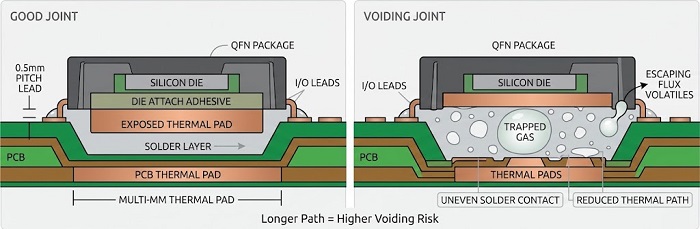
Most thermal pad voids are trapped flux volatiles, and the pad design decides how much of that gas gets out before the solder closes over it.
As the board heats, solvents and activator by-products boil off. Under a 0.5 mm pitch lead the joint is tiny and the gas leaves sideways almost at once. The exposed pad is a different situation. It can be several millimeters across, the package sits only a fraction of a millimetre above the board, and molten solder wets the component pad and the PCB pad at the same time. Gas generated near the center has a long, narrowing path to the edge, and once the perimeter wets and seals, whatever is still inside stays there as a void.
A few board-side conditions make this much worse. A single full-size aperture prints one slab of paste with no channels for gas to travel along. Open thermal vias hold air and absorbed moisture, and as solder runs down the barrel it pushes that air up into the joint. Oxidized pad finish slows wetting and gives volatiles more time to collect; published industry studies on QFN voiding have also found that voiding climbs with each additional reflow pass, which matters when the QFN is placed on the first side of a double-sided board. The last one surprises people. The same study reported that reducing paste volume increased voiding, so printing less paste is not a fix on its own.
How much a void matters depends on the part. On a power QFN the pad is the main heat path from the die into the copper, and a large void under the die hot spot raises junction temperature. On an RF device the same pad is usually the ground return, and voids change the ground path the RF designer modeled. In both cases the location of a void matters about as much as its total area.
Windowpane apertures: how much coverage?
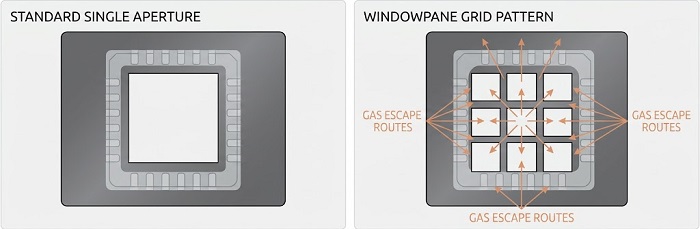
Divide the thermal pad aperture into a grid of smaller openings and print the coverage the device datasheet recommends, which for most QFN and DFN parts falls somewhere between about 50% and 80% of the pad area.
Each pane prints its own island of paste, and the gaps between islands stay open long enough during reflow for gas to escape before the solder coalesces into one joint. A 2×2 grid is common on small pads. Larger pads usually get 3×3 or more, so that no single pane is big enough to behave like the slab you were trying to avoid. Keep the pattern symmetric about the package center: an uneven deposit lets the package tilt or float to one side, and that shows up as opens or bridges on the I/O leads rather than on the pad itself.
Where you land inside that range is a trade. Higher coverage lifts the package and fills the pad more completely, but too much volume floats the part off its leads. Lower coverage vents better and keeps the leads seated, yet it starves the joint and, as noted above, does not reliably lower voiding. We usually start from the datasheet figure. If the datasheet is silent, we propose a starting pattern based on pad size and via layout, then adjust after the first-article X-ray.
Square panes with small corner radii release cleanly from a laser-cut stencil, round dots leave slightly more open channel for the same coverage, and stripes suit the long, narrow pads found on DFN and some power packages. This is how we compare the common patterns:
| Aperture pattern | Gas venting | Volume and standoff control | Where we use it |
|---|---|---|---|
| Single full opening | Poor, no escape channels | Hard to control; tends to float the part | Very small pads only, and only if the datasheet calls for it |
| Windowpane grid (square panes) | Good | Predictable; coverage easy to tune pane by pane | Default for most QFN thermal pads |
| Round dot array | Good to very good | Slightly less volume per unit area | Pads with many vias, where dots can sit between via positions |
| Stripes or bars | Good along the stripe direction | Good on long, narrow pads | DFN, SON and rectangular power pads |
One rule we apply every time: put the webs, not the panes, over via locations. A pane printed directly over an open via feeds paste straight down the barrel.
Vias in the thermal pad: open, tented or filled?
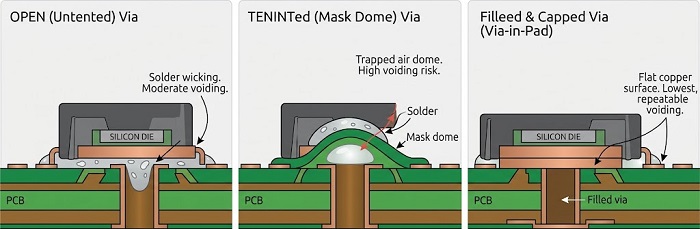
Filled and plated-over vias give the most predictable thermal pad joint, small open vias work when the stencil keeps paste off them, and tenting the vias with solder mask on the component side is the option we push back on.
Without thermal vias, heat from the pad spreads only through the top copper. IC vendor layout guidance for open thermal vias commonly calls for drills of 0.3 mm or smaller on roughly 1 mm spacing, and the device datasheet should be your first reference for count and placement. For assembly, the question is what each via does to the solder during reflow.
| Via treatment | What happens in reflow | Voiding behavior | Fab cost | Our view |
|---|---|---|---|---|
| Open (untented) | Solder wicks into barrels and may protrude on the bottom side | Moderate; barrel air is pushed into the joint and solder is lost from the pad | No adder | Acceptable with small drills and panes kept clear of vias |
| Mask tent on component side | Mask dome sits under the package and traps air | High; a void tends to form at every tent | Low | Avoid |
| Tented or plugged from bottom side only | Solder cannot escape, but the open cup on top holds air | Voids often sit directly over each via | Low | Better than a top tent, still a compromise |
| Filled and capped (via-in-pad) | Flat copper surface, no barrel to wick into | Lowest and most repeatable | Extra fab steps | Our preference for power and RF parts with many vias |
IPC-7093 itself recommends plugging thermal vias to stop solder wicking, and published voiding studies agree that removing the via opening is the single most effective change. With open vias, the same studies found that a fuller thermal pad print can be fine when there are only a few vias, while a high via count calls for a divided print so the gas has more routes out.
Fill-and-cap does cost more at the board stage, and on a simple board with a modest power budget it is rarely worth it. Where the QFN carries real heat or the pad is an RF ground, we usually recommend it. Because we fabricate the bare board and assemble it, that decision gets made once, at quote stage, against our via-in-pad process instead of being negotiated between two suppliers. Whatever you choose, state it in the fab notes.
Stencil thickness trade-offs with fine-pitch leads
Foil thickness is normally set by the finest-pitch part on the board, not by the QFN thermal pad, so the pad has to be designed to work at whatever thickness the fine-pitch leads allow.
Narrow apertures on fine-pitch QFN leads need a thin foil so paste releases cleanly. The thermal pad then gets its volume from coverage and pane layout at that thickness. Opening the pad up to one large aperture to "make up" volume undoes everything the windowpane was doing.
When one foil genuinely cannot serve both needs, there are three practical routes. The first is staying inside the datasheet coverage range and moving toward its upper end, which is often enough. The second is a step stencil with a locally thicker or thinner region; it needs a keep-out between the stepped area and neighboring apertures so the squeegee can seal, so it suits boards with some space around the QFN. The third, useful in high-mix, low-volume builds where a step stencil for a short run is hard to justify, is adding paste to selected pads with our MYCRONIC jet printer after stencil printing. Exact foil thickness and step depth depend on your part mix and our printer setup, so confirm with our engineering team before you finalize the paste layer.
Whatever thickness is chosen, 3D SPI measures the deposit on every pane before placement. An under-printed pane is caught at the printer, not on the X-ray screen.
How is voiding checked?
Thermal pad voids are only visible by X-ray, so we measure void area with offline X-ray on first articles and on an agreed sample, and the results are logged against the board in Smart MES.
3D AOI sees lead toes and side fillets but nothing under the package body. In a top-down X-ray image, voids appear as lighter regions inside the darker solder area, and the software reports void area as a percentage of the pad. Two things need to be agreed before those numbers mean anything. One is whether via barrels are excluded from the calculation; an open via can be counted as a void if nobody masks it out, while a filled via images as solder. The other is whether the criterion is total void area, largest single void, or both. One large void over the die hot spot can matter more than many small ones scattered along the pad edge.
On acceptance, IPC-7093 (Design and Assembly Process Implementation for Bottom Termination Components) gives a general ceiling for center pad voiding but qualifies it: where voiding would noticeably reduce thermal performance, the limit should be tightened and evaluated device by device. A power part running near its junction limit and a low-power RF part will rarely end up with the same number. In practice, your assembly drawing or build notes should state both the limit and the measurement method. If they do not, we ask at DFM review.
When results come back worse than agreed, we work through causes in a fixed order: paste volume from the SPI record, pane layout against via positions, via treatment, and only then the reflow profile on our JTR-1200D-N oven, mostly soak time. Starting with the profile is tempting because it is quick to change, but it seldom fixes a layout problem.
QFN layout and stencil checklist
Run these checks before releasing Gerbers and the paste layer.
| Item | What to check | Why it matters |
|---|---|---|
| Thermal pad size | Matches the datasheet land pattern; not oversized | Oversized pads pull solder outward and can skew the part |
| Pad-to-lead clearance | Mask web between thermal pad and inner lead ends per datasheet | This is where pad-to-lead bridges start |
| Aperture pattern | Windowpane, dots or stripes, not one opening | Gives gas a path out before the joint closes |
| Paste coverage | Within the datasheet range (commonly about 50–80%) | Balances venting, standoff and lead seating |
| Pattern symmetry | Panes symmetric about the package center | Prevents tilt and lead opens |
| Via treatment | Open, bottom-plugged or filled and capped, stated in fab notes | Drives voiding behavior more than any other single choice |
| Component-side mask | No mask tents on vias under the package | Tents trap air directly in the joint |
| Pane vs via position | Webs over vias, not panes | Keeps paste out of open barrels |
| Foil thickness | Set by the finest-pitch part; step stencil or jet printing if needed | Pad volume has to come from coverage at that thickness |
| Double-sided build | Which side, and which reflow pass, the QFN sees | Extra reflow passes increase voiding |
| Acceptance criterion | Void limit and measurement method in build notes | IPC-7093 ties the limit to each device's thermal needs |
If you send the paste layer, fab notes covering via treatment, and the exact part numbers with your files, our DFM review checks each of these items before the stencil is cut.
FAQ
Should I draw the windowpane in my paste layer, or leave it to the assembler?
Either works, as long as it is clear which. If your paste layer already has a divided pattern, we build the stencil to it and raise anything we disagree with at DFM. If it shows one full opening over the pad, we do not change it quietly; we send a proposed pattern for approval, because the coverage choice affects thermal performance that you are accountable for.
Should the PCB thermal pad be larger than the exposed pad on the package?
Generally not beyond what the datasheet land pattern shows. A board pad much larger than the package pad spreads solder outward, lowers the joint under the package and can pull the part off-center during reflow. It also eats into the clearance to the inner ends of the I/O pads.
Do DFN, SON and LGA packages follow the same rules?
The physics is the same, so yes, but the layout changes. Long, narrow DFN and SON pads usually vent better with stripe apertures than with a square grid. Packages with two or more exposed pads need the coverage on each pad balanced against the others so the part lands flat.
Can a QFN with excessive thermal pad voiding be reworked?
It can be removed and replaced, but rework puts extra heat cycles on the board and nearby parts, and re-applying paste under a QFN is harder to control than a production print. We treat rework as a fix for individual boards and correct the stencil or via treatment for the rest of the build, rather than reworking our way through a lot.
Can thermal pad voiding cause problems on the I/O leads?
Indirectly. The causes overlap: too much pad volume floats the package and opens leads, and gas escaping from the pad edge can throw small solder balls toward the I/O row. If lead opens and heavy pad voiding show up on the same part, look at thermal pad coverage first.
Helpful Resources
• Automated X-Ray Inspection (AXI) for PCB Assembly Quality
• AOI vs. X-Ray Inspection: Which is Right for Your PCB Assembly?


