



Printed circuit boards (PCBs) are the unsung backbone of every electronic device we use today, from tiny digital watches and smartphones to large, complex industrial machinery, aerospace equipment, and medical imaging systems. As the fundamental platform that mechanically supports and electrically connects electronic components, PCBs enable the seamless flow of electrical signals and power, making them indispensable to the functionality of any electronic product. Choosing the right PCB—whether for a hobbyist’s DIY project, a professional prototype, or mass production—can make or break your electronic endeavor. However, the vast array of PCB types, specifications, manufacturing options, and pricing factors often leaves buyers overwhelmed.
This comprehensive guide distills all the critical knowledge you need to navigate the PCB buying process with confidence. We cover everything from understanding PCB basics and types to evaluating key purchasing considerations, pricing drivers, design and ordering workflows, cost optimization strategies, and how to select a reliable manufacturer. By the end, you’ll have a clear roadmap to make informed decisions that align with your project’s technical requirements, budget, and production timeline.
What Is a PCB?
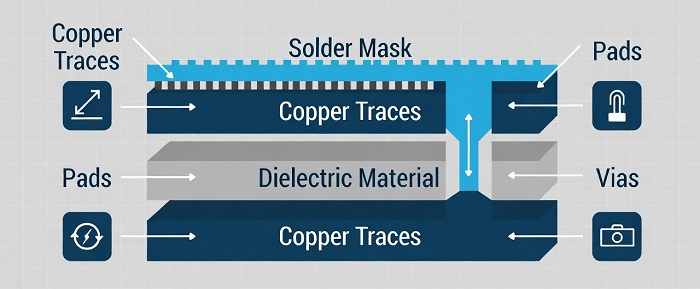
A printed circuit board is a flat board made from a non-conductive substrate (such as fiberglass or polyimide) with thin conductive copper traces etched onto its surface—or multiple surfaces, for complex designs. These copper traces act as pathways to connect electronic components (e.g., resistors, capacitors, integrated circuits, diodes) mounted on the board, facilitating the transmission of electrical signals and power between parts. Beyond copper traces, key PCB components include pads (for soldering components), vias (drilled holes that connect traces across different layers), solder masks (to protect copper from oxidation), and silkscreens (for labeling components).
PCBs use two primary assembly methods to attach components: Surface Mount Technology (SMT) (or Surface Mount Assembly, SMA) and through-hole soldering. SMT is faster and more cost-effective for high-volume production, while through-hole soldering creates sturdier component connections, making it ideal for applications where durability is critical—though it comes with a higher price tag.
The global PCB market is experiencing steady growth, driven by the demand for compact, high-performance electronics in sectors like automotive, telecommunications, and wearable tech. According to industry research, the global PCB market size is projected to reach USD 118.63 billion by 2031, growing at a compound annual growth rate (CAGR) of 4.94% from 2024 to 2031. PCBs are ubiquitous across virtually all industries, including consumer electronics, medical devices, automotive components, aerospace systems, industrial equipment, LED lighting, and security devices, proving their versatility and importance in modern technology.
The Main Types of PCBs and Their Applications
Not all PCBs are created equal—each type is engineered to suit specific mechanical, electrical, and environmental requirements. The right PCB type for your project depends on factors like circuit complexity, space constraints, operating conditions, and cost. Below is a detailed breakdown of the most common PCB types, their pros and cons, and ideal use cases:
1. Single-Layer PCBs
The simplest and most cost-effective PCB design, single-layer PCBs feature a single layer of copper traces on one side of a non-conductive substrate. They are easy to manufacture, repair, and prototype, making them a go-to for basic circuits.
· Pros: Low cost, straightforward fabrication, easy troubleshooting.
· Cons: Limited wiring density, no flexibility for complex circuit routing.
· Ideal for: Calculators, basic sensors, simple power supplies, and low-cost consumer electronics with minimal functionality.
2. Double-Layer PCBs
Double-layer PCBs have copper traces on both sides of the substrate, connected by small plated holes called vias. This design doubles the wiring space and allows for more flexible component placement compared to single-layer PCBs.
· Pros: Higher component density, improved routing flexibility, cost-effective for moderate complexity.
· Cons: Slightly more expensive than single-layer PCBs; requires precise alignment during manufacturing.
· Ideal for: Telecom systems, HVAC controls, instrumentation, and mid-range consumer electronics like basic audio devices.
3. Multilayer PCBs
Multilayer PCBs consist of three or more layers of copper traces separated by insulating substrates, laminated together under heat and pressure. Some high-end multilayer PCBs feature 30+ layers, making them capable of supporting ultra-complex, high-speed, and high-density circuits.
· Pros: Enables advanced signal processing, maximizes space efficiency, supports high-speed and high-frequency applications.
· Cons: High manufacturing cost, longer production time, difficult to inspect and repair.
· Ideal for: Medical imaging devices (e.g., CAT scanners), aerospace and satellite systems, servers, computers, and high-performance industrial equipment.
4. Rigid PCBs
Rigid PCBs are the most common type of PCB, made from a rigid fiberglass substrate (typically FR-4). They are sturdy, durable, and economical to produce, making them the standard for most static electronic devices.
· Pros: Low cost, easy mass production, high structural stability.
· Cons: Inflexible, difficult to fit into compact or irregularly shaped spaces.
· Ideal for: Most stationary electronic devices, including desktop computers, home appliances, and industrial machinery.
5. Flexible PCBs
Flexible PCBs are made from flexible, heat-resistant substrates like polyimide. They can be bent, folded, or twisted to fit into tight or irregular spaces, and they withstand vibration and mechanical stress better than rigid PCBs.
· Pros: Space-saving, vibration-resistant, heat-resistant, ideal for compact or movable devices.
· Cons: More fragile during handling, higher fabrication cost, limited component mounting options.
· Ideal for: Wearable technology, foldable displays, automotive internal components, and aerospace equipment with tight space constraints.
6. Rigid-Flex PCBs
Rigid-flex PCBs combine the best features of rigid and flexible PCBs, with rigid sections for mounting components and flexible sections for routing signals in tight spaces. Their interconnectivity is embedded within the board, reducing overall size and weight while maintaining durability and flexibility.
· Pros: Lightweight, compact, highly reliable, combines structural stability and flexibility.
· Cons: High manufacturing cost, complex design and fabrication.
· Ideal for: Medical implant devices, aerospace systems, high-end automotive components, and portable electronics where space and weight are critical.
7. High-Frequency PCBs
Designed specifically for radio frequency (RF), microwave, and high-speed digital applications, high-frequency PCBs use specialized substrates like Rogers or PTFE (Teflon) that minimize signal loss at high frequencies and offer stable dielectric properties.
· Pros: Low signal loss, high dielectric stability, optimized for high-frequency performance.
· Cons: Expensive, difficult to source and process, limited manufacturing expertise required.
· Ideal for: 5G infrastructure, radar systems, wireless communication modules, and satellite communication equipment.
Key Considerations When Buying a PCB
Purchasing the right PCB requires more than just selecting a type—it demands a careful evaluation of your project’s unique needs, technical specifications, and quality requirements. Below are the critical factors to consider before making a purchase:
1. Application Suitability
The first step is to ensure the PCB is tailored to your project’s application and industry. For example:
- Industrial, medical, and aerospace applications require high-reliability multilayer PCBs with strict quality standards.
- Basic consumer electronics and hobby projects can use cost-effective single or double-layer rigid PCBs.
- Testing and troubleshooting work calls for breadboard PCBs, which allow for easy component prototyping and modification.
- High-frequency or RF projects need specialized high-frequency PCBs with premium substrates.
Always match the PCB’s capabilities to the operating environment (e.g., high temperature, moisture, vibration) and functional requirements (e.g., high-speed signal transmission, high current load).
2. Technical Specifications and Substrate Choice
The technical specs of a PCB directly impact its performance, durability, and cost. Key specs to evaluate include:
· Substrate Material: FR-4 (fiberglass epoxy) is the standard, cost-effective substrate for most applications, offering good strength and flame resistance. Flexible PCBs use polyimide (5–10 times more expensive than FR-4), while high-frequency PCBs use Rogers or PTFE.
· Copper Thickness: Measured in ounces per square foot (oz/ft²), common values are 1 oz (35 μm) and 2 oz (70 μm). Thicker copper handles higher current loads but increases cost.
· Glass Transition Temperature (Tg): Critical for high-temperature environments—choose substrates with a Tg of >170°C for power electronics or industrial applications.
· Surface Finish: Options include HASL (hot air solder leveling), ENIG (electroless nickel immersion gold), and OSP (organic solderability preservative). ENIG is preferred for high-precision boards, while HASL is cost-effective for basic applications.
· Impedance Control: Mandatory for high-speed digital and RF circuits to ensure consistent signal transmission and minimize loss.
· Compliance: Ensure the PCB is RoHS-compliant (lead-free) to meet global environmental standards, and check for industry-specific certifications (e.g., UL for safety) if required.
3. Quality and Manufacturing Standards
Quality is non-negotiable—poorly manufactured PCBs can lead to device failure, costly rework, and project delays. Evaluate a manufacturer’s quality control processes by checking:
- Industry certifications (e.g., ISO 9001 for quality management, RoHS for environmental compliance).
- Testing protocols (e.g., Automated Optical Inspection (AOI), in-circuit testing (ICT), X-ray inspection, functional testing).
- Documentation: Reliable manufacturers provide detailed test reports and quality documentation to verify PCB performance.
4. Customization and Prototyping Capabilities
Most projects—especially new product development—require custom PCB designs (e.g., custom dimensions, hole sizes, silkscreen labeling) and prototyping. Look for a manufacturer that:
- Supports small-batch prototyping (1–100 units) to validate your design before mass production.
- Offers Design for Manufacturing (DFM) analysis to identify and fix design flaws early, reducing rework costs.
- Can accommodate custom specifications (e.g., copper thickness, surface finish, board shape) without excessive markup.
5. Manufacturer’s Service and Delivery Capabilities
The PCB manufacturer you choose is a critical partner in your project. Evaluate their service offerings by checking:
· One-stop Services: Whether they provide both PCB fabrication and assembly (PCBA)—this streamlines the supply chain and reduces coordination effort.
· Short-Run Production: If you only need a small number of PCBs, ensure the manufacturer supports short runs to avoid paying for large custom batches.
· Delivery Timelines: Confirm lead times for prototyping and production, and check if they offer expedited shipping (note: expediting often incurs a premium).
· Logistics and After-Sales Support: Ensure they offer reliable global shipping and responsive after-sales support (e.g., defect replacement, technical troubleshooting).
· Pricing Transparency: Avoid manufacturers with hidden fees (e.g., setup fees, shipping fees, panelization fees); request a detailed cost breakdown for all services.
PCB Pricing Factors and Cost Ranges
PCB pricing varies dramatically—from as little as $0.50 for a basic single-layer board to $300+ for a high-complexity multilayer PCB—driven by a host of manufacturing, assembly, and order-related factors. Understanding these drivers will help you budget effectively and optimize costs.
Key Factors That Influence PCB Pricing
1. Manufacturing Complexity: Layer count is the biggest driver—multilayer PCBs cost significantly more than single/double-layer boards, with each additional layer in flexible PCBs increasing costs by 25–50%. Other factors include board size (larger boards = more materials), shape (rectangular boards are most cost-effective; irregular shapes increase fabrication time), trace/space width (tighter traces = higher difficulty), and hole size/count (many small vias increase drilling time).
2. Assembly Type and Components: SMT assembly is cheaper and faster than through-hole soldering. The number, type, and package size of components also impact cost—industry-standard component packages are more affordable, while custom or fine-pitch components increase pricing. Component placement complexity (e.g., dense layouts) also adds to assembly costs.
3. Order Volume and Batch Size: PCBs follow economies of scale—small prototyping quantities have a much higher per-unit cost than high-volume production runs. Batch size also matters: ordering fewer large panels is cheaper than many small panels due to setup costs.
4. Testing and Value-Added Services: Additional testing (e.g., AOI, ICT, X-ray) and services (e.g., conformal coating, potting, silkscreening) add cost but improve reliability. Non-recurring engineering (NRE) fees (for DFM analysis, stencil creation, and test program development) are common for new designs.
5. Lead Time and Location: Expedited delivery incurs premium fees. Overseas manufacturing is often cheaper for high-volume production, while local manufacturing offers faster lead times and better communication (at a higher cost).
Typical PCB Cost Ranges by Use Case
Pricing varies based on production volume, complexity, and quality requirements. Below are realistic cost ranges for common scenarios (as of 2026):
· Hobbyist/DIY Projects: Single/double-layer FR-4 boards (<50mm x 50mm), small batches (1–10 units): $5–$10 per board. These boards use basic HASL surface finish and limited through-hole components.
· Prototyping (10–100 units): 4–6 layer boards (<200mm x 200mm), mixed SMT/through-hole components, ENIG finish, and electrical testing: $50–$300 per board.
· Medium-Volume Production (100–5000 units): 4+ layer boards, HDI technology, lead-free finish, and functional testing: $10–$50 per board.
· High-Volume Production (5000+ units): High-layer count boards, automated assembly/inspection, and mass production economies of scale: <$10 per board (often <$1 for basic designs).
PCB Cost Breakdown
A PCB’s total price consists of three core components:
1. Direct Fabrication Costs: Raw materials (substrates, copper, solder mask), labor, equipment depreciation, and manufacturing overhead (facilities, utilities).
2. Engineering and Support Costs: DFM analysis, testing setup, quality assurance, prototyping, and documentation. These costs increase with design complexity.
3. Manufacturer Profit Margin: Typically 10–30% of base costs—lower for high-volume orders, higher for small-batch or custom prototyping (sometimes up to 100%).
The Complete PCB Design and Ordering Process
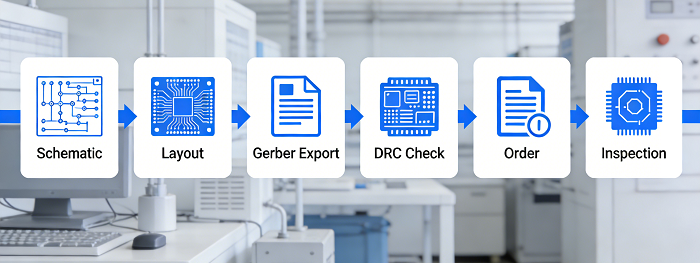
Designing and ordering a PCB is a structured process that requires attention to detail to avoid costly mistakes. Below is the step-by-step workflow for a successful PCB purchase, from design to delivery inspection:
Step 1: Develop a Circuit Schematic and Prototype
Start by creating a detailed circuit schematic using PCB design software (e.g., Eagle, Altium). Choose software that allows you to simulate and test circuit behavior to ensure functionality—free tools like Eagle have limitations (4-layer max, 160 cm² design size), while professional tools like Altium offer unlimited design capabilities. Build a working prototype to validate the schematic; a non-functional circuit renders even the highest-quality PCB useless.
Step 2: Design the PCB Layout
Translate the validated schematic into a PCB layout, focusing on trace routing, component placement, and heat dissipation. Key tips:
- Use the manufacturer’s recommended design rules (e.g., trace width, via size) to ensure manufacturability.
- Design to standard board dimensions to avoid custom fabrication fees.
- Leverage manufacturer-provided design software and resources for a smoother process.
Step 3: Export Gerber Files
Gerber is the industry-standard file format for PCB manufacturing, used by plotters to print copper traces on the substrate. Ensure your design software can export Gerber files that include all layers (copper, solder mask, silkscreen), drill holes, and vias—this is non-negotiable for accurate fabrication.
Step 4: Double-Check the Design
Conduct a thorough design review and Design Rule Check (DRC) to catch errors (e.g., incorrect trace width, unconnected vias, component placement issues). Have the manufacturer perform a DFM analysis for an extra layer of validation. Fixing errors at this stage is far cheaper than reworking manufactured PCBs.
Step 5: Place Your Order
Once the design is finalized, select a manufacturer, upload your Gerber files, and confirm all specifications (layer count, substrate, surface finish, batch size, lead time). Review the quote carefully for transparency and confirm payment terms before placing the order.
Step 6: Inspect Delivered PCBs
Upon delivery, inspect the PCBs for shipping damage and manufacturing defects (e.g., broken boards, incomplete traces, undrilled holes, misaligned components) before starting the soldering process. If defects are found, contact the manufacturer for a replacement immediately—this minimizes project delays and rework costs.
Cost Optimization Strategies for PCBs
Reducing PCB costs without sacrificing performance or reliability is possible with strategic design and purchasing decisions. Below are actionable tips to optimize costs at every stage of the process:
Design-Stage Optimization
Design choices have the biggest impact on PCB cost—optimize early to avoid expensive changes later:
1. Minimize layer count: Use the simplest layer design that meets your functional needs (e.g., single/double-layer instead of multilayer).
2. Standardize dimensions and holes: Use standard board sizes and common hole/via sizes to reduce tooling complexity and fabrication time.
3. Avoid over-engineering: Specify tight tolerances, fine traces, and premium finishes only where functionally necessary.
4. Optimize component selection: Use industry-standard component packages, reduce the number of components by improving circuit efficiency, and avoid custom or hard-to-source parts.
5. Maximize panel utilization: Design boards to fit into standard panel arrays to reduce material waste and fabrication costs.
6. Limit design iterations: Only re-spin the design for critical issues—each iteration adds time and cost.
Purchasing-Stage Optimization
1. Plan for volume: If mass production is planned, order a small prototype batch first, then scale up to leverage economies of scale.
2. Avoid expedited shipping: Plan lead times in advance to skip costly expediting fees.
3. Leverage manufacturer input: Engage manufacturers early in the design process for DFM advice—they can identify cost-saving opportunities you may miss.
4. Compare multiple quotes: Collect quotes from several manufacturers to ensure competitive pricing, and negotiate for volume discounts.
5. Minimize layer count: Combine small projects into a single order to increase batch size and reduce per-unit costs.
How to Select a Reliable PCB Manufacturer
Choosing the right PCB manufacturer is as important as designing the perfect PCB—they are your partner in turning a design into a physical product. Below is a checklist to evaluate and select a reliable manufacturer:
1. Matching production capabilities: Ensure the manufacturer can produce your specific PCB type (e.g., flexible, multilayer, high-frequency) and handle your assembly needs (SMT/through-hole).
2. Proven quality control: Look for ISO 9001 certification, robust testing protocols (AOI, ICT, X-ray), and detailed quality documentation.
3. Transparent pricing: No hidden fees—request a detailed cost breakdown for all services (fabrication, assembly, testing, shipping).
4. Prototyping and customization support: The ability to produce small-batch prototypes and accommodate custom designs is critical for new projects.
5. Responsive technical support: Access to a professional technical team for DFM analysis, design guidance, and after-sales troubleshooting is essential.
6. Stable delivery: A track record of on-time delivery and reliable logistics (including global shipping) ensures your project stays on schedule.
7. Industry experience: Manufacturers with experience in your industry (e.g., medical, aerospace) understand unique quality and compliance requirements.
Conclusion
Buying the right PCB is a holistic process that requires a deep understanding of your project’s needs, technical specifications, and manufacturing options. From selecting the correct PCB type to optimizing design for cost, evaluating manufacturer capabilities, and inspecting delivered boards, every step plays a critical role in the success of your electronic project. The key takeaway is to balance cost, quality, and performance—the cheapest PCB is not always the best choice if it fails to meet your functional or reliability requirements, just as an over-engineered PCB will waste budget on unnecessary features.
By following the guidelines in this guide, you’ll be able to navigate the PCB buying process with confidence, avoid common pitfalls, and make informed decisions that align with your project’s goals. Whether you’re a hobbyist working on a small DIY project, an engineer developing a prototype, or a business scaling up for mass production, the right PCB and manufacturing partner are the foundation of a successful electronic product.
Your Trusted PCB Partner: pcbcart
When it comes to sourcing high-quality PCBs with reliable fabrication and assembly services, pcbcart stands out as a trusted partner for electronic projects of all scales—from hobbyist prototypes to high-volume industrial production. Specializing in PCB fabrication and PCB assembly, pcbcart combines advanced manufacturing equipment, a strict quality control system, and a team of experienced engineering professionals to deliver customized PCB solutions tailored to your unique requirements.
pcbcart offers end-to-end support for every stage of the PCB process, including DFM analysis, prototyping, custom fabrication, and full assembly (SMT and through-hole). With a focus on pricing transparency, on-time delivery, and RoHS/ISO compliance, pcbcart is committed to helping customers turn their PCB design ideas into high-quality, functional products efficiently and cost-effectively. Whether you need a simple single-layer PCB for a hobby project or a complex multilayer rigid-flex PCB for aerospace applications, pcbcart has the capabilities and expertise to meet your needs.
Quote NOW to Save Up to $300 for Your PCBs
Helpful Resources
• How Much Does a Printed Circuit Board (PCB) Cost?
• How Much Does PCB Assembly Cost : A Complete Guide From Basics to Optimization Approaches
• Printed Circuit Boards Assembly (PCBA) Process
• PCB Board Material, PCB Material Type
• Full Feature PCB Manufacturing Service - Free Quote


