



An NRND part is still orderable, but the manufacturer has told you not to design it into anything new. If you freeze a BOM with NRND parts in it, you are signing up for a redesign or a last-time buy before the product has run its first volume build. Check lifecycle status on every line before design freeze, and treat anything that is not Active as a decision that needs an owner, not a note in the BOM.
What do Active, NRND and EOL actually mean?
The labels are the manufacturer's, and the wording differs from one vendor to the next. In practice they sort into four groups.
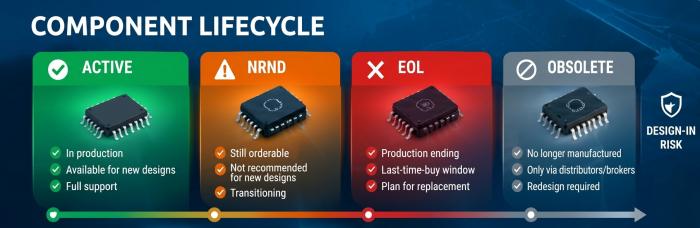
Active means the manufacturer is producing and selling the part for new designs. You can design it in, though it is still worth checking whether it is single-sourced. NRND (Not Recommended for New Designs) means the part is still available, but the manufacturer is steering customers toward something else. We would avoid it in a new design, and if it is already on your BOM, start the checks in the section on what to do when a part is already NRND.
EOL, usually announced through a PCN with a last-time-buy window, means production is ending and the manufacturer has set a date by which orders must be placed. That is the moment to decide between a buy and a redesign, not after the window closes. Obsolete means the part is no longer made and whatever remains sits with distributors and brokers, so for anything new we treat it as a redesign item.
Two things here trip people up. First, status is often set at the ordering-code level, not the family level. A device family can be Active while the specific package, temperature grade or reel option you picked is NRND. Read the status for the exact orderable part number on your BOM.
Second, a distributor's lifecycle flag can lag the manufacturer's notice. Aggregator databases are good for screening a 300-line BOM quickly, but when a line comes back flagged, go to the manufacturer's product page or the PCN itself. We have seen "Active" on a distributor listing for parts the manufacturer had already marked NRND, and the reverse, where a stale NRND flag scared a team off a part that had been reinstated.
When should you check lifecycle status?
At part selection, which is earlier than most teams do it. Lifecycle review is usually filed under BOM release, but by then the layout is done, the footprint is locked, and swapping an IC for a different package means a board respin.
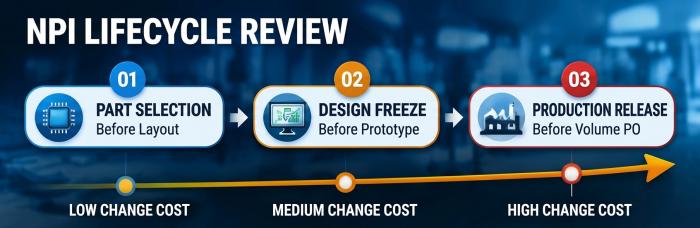
There are three checkpoints worth putting on the schedule:
When the part is chosen in the schematic, before layout starts. This is the cheapest time to change your mind.
Before design freeze or prototype release. Rerun the whole BOM, because things change between the first selection and the freeze.
Before production release and the first volume PO. This catches anything that moved during the prototype phase.
On long programs, add a recheck at every BOM revision. How often is up to you; the point is that it should be tied to a BOM event, not to someone remembering.
Not every line deserves the same attention. Resistors and ceramic capacitors from major families are normally second-sourceable, so an NRND flag there is an inconvenience. The lines that hurt are microcontrollers, FPGAs and other programmable devices, PMICs, RF parts, connectors with specific footprints, crystals and oscillators, displays, and custom or semi-custom magnetics. If one of those goes EOL, there is often no drop-in replacement, and the software or the board has to change with it.
Procurement is usually the first to notice a problem, when a quote comes back with no stock and no factory lead time. By that point the design is frozen and the options are all expensive. We only receive the Gerber and BOM, since we do not offer schematic design, so the lifecycle check has to happen on the design side before the files reach any manufacturer.
What to do when a part is already NRND
Do not panic, and do not ignore it either. A part can stay NRND for a long time, or it can be pulled in months. The notice tells you which, so go and read it.
Confirm the status at the source. Open the manufacturer's page for the exact orderable part number and read the notice text, not just the status field.
Find out why. A manufacturer retiring an older process node behaves differently from one consolidating a product line, and the notice sometimes names a recommended successor.
Check the successor honestly. "Recommended replacement" does not always mean pin-compatible, software-compatible and electrically equivalent. Have the design engineer read the datasheet differences line by line, including absolute maximum ratings, startup behavior and any errata.
Look for second sources, but only form-fit-function equivalents that your design engineer approves. A part that is close on paper but has different thermal or timing behavior is a requalification, not a swap.
Size the exposure. Estimate how many units you will build over the product's life, and compare that with what you could reasonably buy now.
How you buy matters as much as what you buy. Once a part is heading toward end of life, the market fills with stock of uneven quality. Counterfeit and relabeled parts show up in exactly these situations. We would rather see a purchase through the manufacturer or an authorized channel, even at a higher unit price, than a broker lot for a device you cannot easily replace. Our authorized channel sourcing approach is covered on the components sourcing page, and if the part is critical to the design it is worth reading before you commit to a buy.
For products with long service lives and heavy change control, such as medical devices, we covered the longer-horizon version of this problem in our piece on medical device PCBA obsolescence management. This article stays on the earlier question: what you can do before the design is frozen.
Last-time buys and redesign trade-offs
There are four realistic paths, and none of them is free.
| Option | Where the cost lands | Main risk | Fits when |
|---|---|---|---|
| Ship with the NRND part, buy ahead | Inventory carrying cost | Notice shortens the window | Low lifetime volume, short product life |
| Last-time buy at the EOL notice | Cash tied up in stock | Wrong forecast, storage problems | Part is hard to replace, volume is predictable |
| Approved alternate part | Qualification work | Subtle behavior differences | A true form-fit-function match exists |
| Redesign around a current part | Engineering time, new layout, retest | Schedule slip | Part is core to the design and demand is long-term |
A last-time buy is easy to approve and hard to size. Start from the forecast over the whole product life, then add what you will need for build overage, rework, field returns and service spares. Be skeptical of your own forecast, since sales numbers made at NPI are rarely exact. Overbuying costs money, but underbuying can force a redesign under deadline pressure, which usually costs far more.
Storage is part of the plan too. Moisture-sensitive devices and parts with limited shelf life need proper storage for as long as you hold them, so read the manufacturer's handling and storage guidance before the buy. If you intend to ask us to hold stock for you, settle where it is kept and for how long beforehand, and confirm with our engineering team before anything is ordered.
Redesign is rarely the first choice at NPI, but at this stage it is cheaper than it will ever be again. If a core part is NRND before the layout is finished, switching now costs a schematic edit. After the first production run, the same switch costs a respin, requalification and a change notice to your customers. For programs where the build volume is small, the HMLV nature of the work often pushes the balance toward a clean redesign over a stockpile of an aging part, and our low-volume assembly capabilities are set up around that kind of program.
Lifecycle review checklist
Run this against the full BOM at each checkpoint, not just at the end.
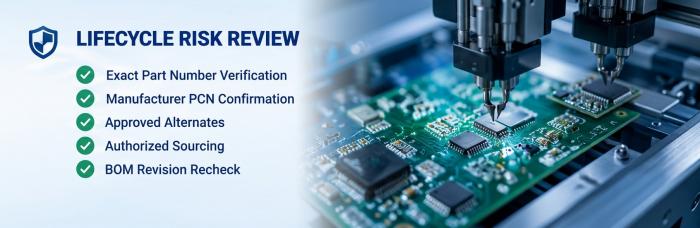
Every line has a lifecycle status recorded for the exact orderable part number, with the source and the date checked.
Anything marked NRND, EOL or Obsolete has a named owner and a written decision (keep, buy ahead, replace, redesign).
Single-source parts are listed separately, with the reason a second source does or does not exist.
High-risk categories (programmable devices, power ICs, RF, connectors, crystals, displays, custom magnetics) have been checked by hand, not only by database.
Each flagged part has a manufacturer notice or PCN on file, not just a distributor flag.
Any proposed alternate has been reviewed by the design engineer against the datasheet and signed off.
Last-time-buy quantities show how they were calculated: lifetime forecast, build overage, spares.
The buying channel for flagged parts is recorded and traceable to the manufacturer or an authorized distributor.
Storage requirements for held stock are known, along with who is responsible for it.
Recheck dates are tied to BOM revisions and to the production release.
FAQ
Can I use an NRND part if the product is only a prototype or a pilot run?
Often yes, as long as you know it is NRND and the build quantity is small. The risk is that the pilot design becomes the production design by default. Write down that the part is a known risk and decide before volume release, not after.
Who is responsible for lifecycle checks, the designer or the assembler?
The design owner. The BOM is your design intent, so substituting a part is your decision and your sign-off. A good assembler will tell you when a part looks problematic, but the design-side check should be done before files are released.
How reliable are lifecycle databases?
They are good for screening and poor as final authority. They are often updated after the manufacturer's own notice, and they sometimes merge a family's status with the status of a specific package. For any part that matters, read the manufacturer's page.
An Active part is single-source. Should I worry?
Yes, in a different way. Single-source does not mean a notice is coming, but it does mean you have no fallback if supply tightens or the manufacturer changes course. For critical lines, record the exposure and decide whether a second source or a small buffer stock is justified.
Is a pin-compatible replacement always safe to use?
No. Pin-compatible only covers the footprint. Startup sequence, thermal behavior, timing margins and firmware dependencies can all differ. Have the design engineer review the differences and run the required tests before treating it as approved.
Helpful Resources
• Component Shortage Contingency for Long-Lifecycle Industrial & Medical Devices
• Managing Obsolescence Risk for Long-Lifecycle Semiconductor Test Equipment PCBA
• Dual Sourcing Medical Electronics: PCBA Strategy Guide
• How to Create a BOM (Bill of Materials)


